Templates · Sign in and sign up screens · Sports app · Oche
Oche Sign in screen
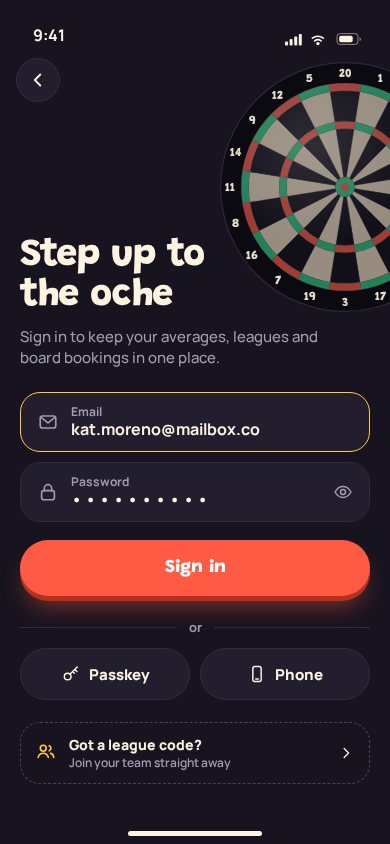
A sign in screen from Oche, a darts scorer and leagues app template in a Playful style. Screen 3 of 25.
Oche is a complete darts app: welcome and setup, sign in, a home with your next fixture and a match to resume, a new game form, a live 501 scorer where you tap the board, a keypad, a leg won moment and a match report, a cricket scoreboard, practice drills with a throw clinic video, stats and a board heatmap, leagues with a table and a fixture night, finding a pub with a board, booking a board with a confirmation, Oche Pro, notifications, profile and settings. Plum ink with board red, double green, cream and a bullseye yellow.
| Detail | Value |
|---|---|
| Screen type | Sign in |
| App | Oche: Darts scorer and leagues |
| Category | Sports |
| Design language | Playful, dark |
| Type | Grandstander for headings, Manrope for text |
| Colours | #17141f background, #221e2d surface, #fdf3e1 text, #a39bb3 text-muted, #ff5a44 accent, #ffffff accent-contrast, #2ccf7f secondary, #322c3f border, #ffcb3d highlight, #f2e2c2 board cream |
What this screen says
- Step up to
- the oche
- Sign in to keep your averages, leagues and board bookings in one place.
- Emailkat.moreno@mailbox.co
- Password••••••••••
- Sign in
- or
- Passkey
- Phone
- Got a league code?Join your team straight away
Around it in Oche
More sign in and sign up screens
- Crag Sign in: Climbing gym logbook
- Fairway Sign in: Golf course guide and scorecard
- Matchday Sign in: Football scores and fantasy
- Rally Sign in: Tennis and padel club
- Swell Sign in: Surf forecast
- Pitwall Sign in: Race engineering
- Elevens Sign in: Fantasy cricket leagues
- Scoreboard Sign in: Scores and news for every sport
- Bib Sign in: Find and enter races
- Wicket Sign in: Live cricket scores
- Courtside Sign in: Pickup basketball games
- Tack Sign in: Sailing wind and regatta tracker
Every sports app sign in screen
What makes a good login screen
- Offer the fastest option first. Sign in with Apple, Google or a passkey takes one tap. If you support them, put them above the email form. Apple asks apps that use a third-party login like Google to also offer an equivalent privacy-focused option, such as Sign in with Apple.
- Separate sign in from sign up clearly. Use different headings and buttons, and a clear link to switch. People who already have an account should never end up creating a second one by accident.
- Use the right keyboard and autofill. Email fields should open the email keyboard and support password managers and one-time code autofill. Small details, big difference in how many people get through.
- Write errors that help. "That password doesn't match this email" is better than "Error 401". Keep what people typed so they only fix the part that was wrong.
The full login screen guide and every example
Remix Oche free: describe your own app and it is drawn in this design. Or get its files from $10: Figma, React Native, SwiftUI, Flutter and HTML.