Templates · Booking and checkout screens · Sports app · Oche
Oche Book a board screen
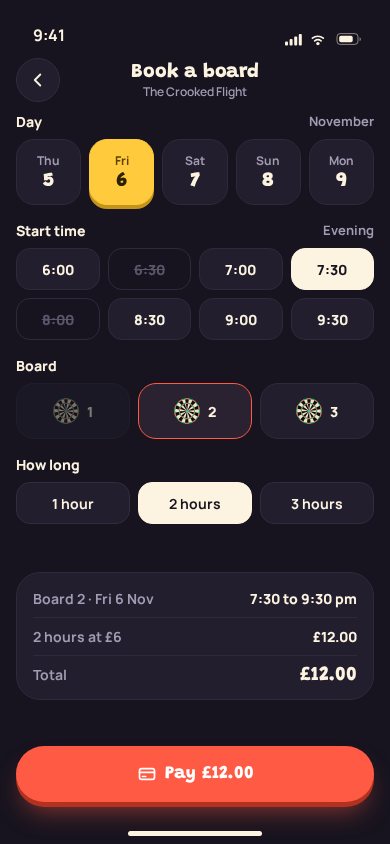
A checkout screen from Oche, a darts scorer and leagues app template in a Playful style. Screen 20 of 25.
Oche is a complete darts app: welcome and setup, sign in, a home with your next fixture and a match to resume, a new game form, a live 501 scorer where you tap the board, a keypad, a leg won moment and a match report, a cricket scoreboard, practice drills with a throw clinic video, stats and a board heatmap, leagues with a table and a fixture night, finding a pub with a board, booking a board with a confirmation, Oche Pro, notifications, profile and settings. Plum ink with board red, double green, cream and a bullseye yellow.
| Detail | Value |
|---|---|
| Screen type | Checkout |
| App | Oche: Darts scorer and leagues |
| Category | Sports |
| Design language | Playful, dark |
| Type | Grandstander for headings, Manrope for text |
| Colours | #17141f background, #221e2d surface, #fdf3e1 text, #a39bb3 text-muted, #ff5a44 accent, #ffffff accent-contrast, #2ccf7f secondary, #322c3f border, #ffcb3d highlight, #f2e2c2 board cream |
What this screen says
- Book a board
- The Crooked Flight
- DayNovember
- Thu5
- Fri6
- Sat7
- Sun8
- Mon9
- Start timeEvening
- Board
- How long
- 1 hour 2 hours 3 hours
- Board 2 · Fri 6 Nov7:30 to 9:30 pm
- 2 hours at £6£12.00
- Total£12.00
- Pay £12.00
Around it in Oche
More booking and checkout screens
- Matchday Confirm transfers: Football scores and fantasy
- Rally Book a court: Tennis and padel club
- Elevens Join league: Fantasy cricket leagues
- Scoreboard Confirm plan: Scores and news for every sport
- Bib Choose event: Find and enter races
- Wicket Tickets: Live cricket scores
- Courtside Join run: Pickup basketball games
- Tack Entry fee: Sailing wind and regatta tracker
- Frag Entry fee: Esports tournaments and teams
- Canter Choose a time: Riding stables and lessons
- Ollie Book session: Skate spots and clips
- Eddy Shuttle: River levels for paddlers
Every sports app checkout screen
What makes a good checkout screen
- Show the total early and honestly. Taxes, delivery and service fees should appear before the last step. A higher total on the final screen feels like a trick.
- Offer wallet payments. Apple Pay and Google Pay skip card typing entirely. Show them first when they are available.
- Ask for the minimum. Only the fields needed to deliver or book. Save details for next time.
- Let people review before paying. A clear summary of items, dates, address and price, with each part editable without starting over.
The full checkout screen guide and every example
Remix Oche free: describe your own app and it is drawn in this design. Or get its files from $10: Figma, React Native, SwiftUI, Flutter and HTML.