Templates · Detail screens · Food app · Nosh
Nosh Review screen
A detail screen from Nosh, a local restaurant reviews app template in a Minimal style. Screen 12 of 25.
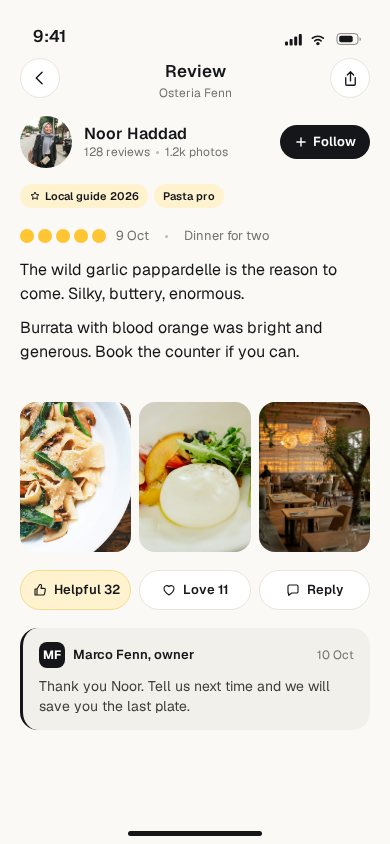
Nosh is a complete local restaurant reviews app: welcome, taste picks, sign in, a home with nearby picks and categories, search, results with photo strips, a map with score pins, a restaurant page with booking slots, the menu, a photo viewer, reviews with a score histogram, a single review with the owner reply, writing a review, booking a table with confirmation and a ticket, a live waitlist, saved lists, a friends feed, a year in food, notifications, a Plus plan, profile and settings. Warm paper and white with ink and saffron.
| Detail | Value |
|---|---|
| Screen type | Detail |
| App | Nosh: Local restaurant reviews |
| Category | Food |
| Design language | Minimal, light |
| Type | Instrument Serif for headings, Geist for text |
| Colours | #faf9f6 background, #ffffff surface, #15161a text, #74726b text-muted, #ffc533 accent, #15161a accent-contrast, #fff3cf secondary, #e8e5dd border, #e5533a danger |
What this screen says
- ReviewOsteria Fenn
- Noor Haddad128 reviews1.2k photos
- Follow
- Local guide 2026 Pasta pro
- 9 OctDinner for two
- The wild garlic pappardelle is the reason to come. Silky, buttery, enormous.
- Burrata with blood orange was bright and generous. Book the counter if you can.
- Helpful 32 Love 11 Reply
- MFMarco Fenn, owner10 Oct
- Thank you Noor. Tell us next time and we will save you the last plate.
Around it in Nosh
More detail screens
- Brigade Ticket: Restaurant kitchen and line ops
- Nibs Result: Food allergy and label scanner
- Ladle Recipe: Recipes and meal planning
- Pantry Product: Grocery delivery
- Brewly Drink: Coffee ordering and loyalty
- Tabla Restaurant: Tables worth dressing for
- Corked Label match: Wine journal and cellar
- Crumb Bake: Neighbourhood bakery
- Tiffin Restaurant: Food delivery
- Courier Offer: Food delivery driver app
- Picker Batch offer: Grocery shopper app
- Queue Spot: Join the waitlist from anywhere
What makes a good detail screen
- Lead with what identifies the item. A large image or title, the price or status, and the key facts at the top. People should know they are in the right place at a glance.
- Keep the main action visible. A sticky bottom button for Add to cart, Book or Play stays reachable while people scroll through details.
- Order information by importance. The facts that decide the choice come first; reviews, specifications and fine print further down.
- Use progressive disclosure. Long descriptions, specifications and policies can expand on tap rather than filling the screen.
The full detail screen guide and every example
Remix Nosh free: describe your own app and it is drawn in this design. Or get its files from $10: Figma, React Native, SwiftUI, Flutter and HTML.