Templates · Detail screens · Fitness app · Nightly
Nightly Bedtime screen
A detail screen from Nightly, a smart ring sleep and readiness app template in a Dark-first style. Screen 9 of 25.
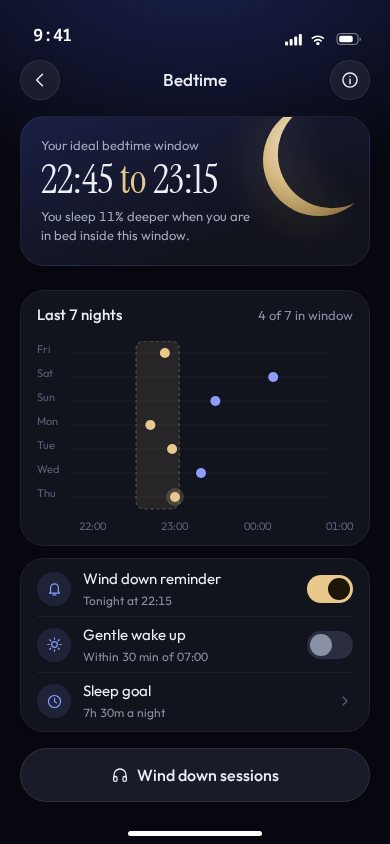
Nightly is a complete smart ring companion: welcome, ring pairing and sign in, a Today home with three halo scores, readiness with its contributors, last night's sleep with a hypnogram and stages, overnight heart rate and HRV, body temperature, an ideal bedtime window, tags, activity, a live workout and its summary, daytime stress, 30 day trends, a journal, guided sessions with a breathing player, circles of friends, notifications, a membership with checkout, the ring itself, profile and settings. Night navy and ink with champagne gold, periwinkle and sage.
| Detail | Value |
|---|---|
| Screen type | Detail |
| App | Nightly: Smart ring sleep and readiness |
| Category | Health and fitness |
| Design language | Dark-first, dark |
| Type | Instrument Serif for headings, Outfit for text |
| Colours | #07080f background, #11131d surface, #eef0f7 text, #8a90a6 text-muted, #e9c98b accent, #1c1508 accent-contrast, #8e9cff secondary, #22263a border, #ff7a6b danger |
What this screen says
- Bedtime
- Your ideal bedtime window
- 22:45 to 23:15
- You sleep 11% deeper when you are
- in bed inside this window.
- Last 7 nights4 of 7 in window
- Fri Sat Sun Mon Tue Wed Thu
- Wind down reminder
- Tonight at 22:15
- Gentle wake up
- Within 30 min of 07:00
- Sleep goal
- 7h 30m a night
- Wind down sessions
Around it in Nightly
More detail screens
- Tabata Workout: HIIT interval timer
- Jab Workout: Boxing workouts with a smart bag
- Exhale Box breathing: Breathwork sessions
- Bump This week: Pregnancy week by week
- Locker Check in: Gym membership and class booking
- Morsel Result: AI calorie tracker
- Dew Concern: AI skin scan and routine
- Cradle Sleep: Baby tracker
- Medly Suggested care: Doctor on call
- Donor Centre: Blood donation, counted drop by drop
- Unfold Class: Yoga and stretching
- Kilo Lift: Strength training log
Every fitness app detail screen
What makes a good detail screen
- Lead with what identifies the item. A large image or title, the price or status, and the key facts at the top. People should know they are in the right place at a glance.
- Keep the main action visible. A sticky bottom button for Add to cart, Book or Play stays reachable while people scroll through details.
- Order information by importance. The facts that decide the choice come first; reviews, specifications and fine print further down.
- Use progressive disclosure. Long descriptions, specifications and policies can expand on tap rather than filling the screen.
The full detail screen guide and every example
Remix Nightly free: describe your own app and it is drawn in this design. Or get its files from $10: Figma, React Native, SwiftUI, Flutter and HTML.