Templates · Detail screens · Food app · Nibs
Nibs Ingredient screen
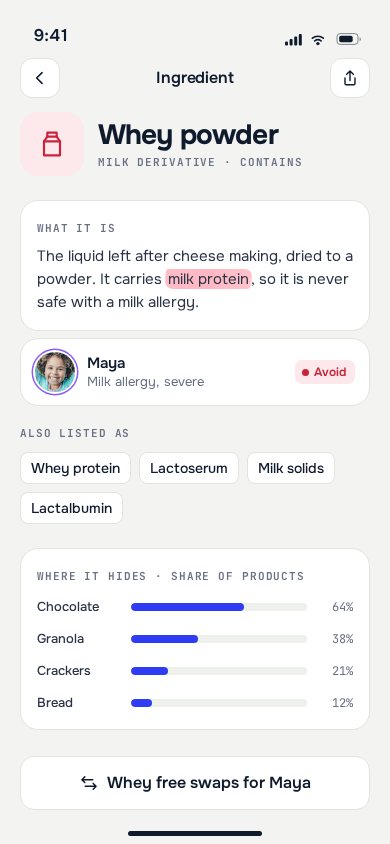
A detail screen from Nibs, a food allergy and label scanner app template in a Clinical style. Screen 8 of 25.
Nibs is a complete allergy scanner for a whole family: welcome, allergen setup and sign in, a home that scans for everyone at once, a live barcode and label scanner, a verdict with the ingredient list highlighted word by word, ingredient explainers, safe swaps and product pages, search, history, family profiles with emergency plans, a translated chef card for restaurants, a reaction log, insights, recalls, a safe groceries basket and order, a family plan, notifications, profile and settings. Paper white and ink navy with cobalt and three highlighter inks.
| Detail | Value |
|---|---|
| Screen type | Detail |
| App | Nibs: Food allergy and label scanner |
| Category | Food |
| Design language | Clinical, light |
| Type | JetBrains Mono for headings, Onest for text |
| Colours | #f3f4f1 background, #ffffff surface, #0f1b2d text, #677083 text-muted, #2f3cf5 accent, #ffffff accent-contrast, #ffe45c secondary, #e2e4de border, #e8384f danger |
What this screen says
- Ingredient
- Whey powder
- Milk derivative · contains
- What it is
- The liquid left after cheese making, dried to a powder. It carries milk protein , so it is never safe with a milk...
- MayaMilk allergy, severe
- Avoid
- Also listed as
- Whey protein Lactoserum Milk solids Lactalbumin
- Where it hides · share of products
- Chocolate64%
- Granola38%
- Crackers21%
- Bread12%
- Whey free swaps for Maya
Around it in Nibs
More detail screens
- Pantry Product: Grocery delivery
- Brewly Drink: Coffee ordering and loyalty
- Tabla Restaurant: Tables worth dressing for
- Corked Label match: Wine journal and cellar
- Crumb Bake: Neighbourhood bakery
- Tiffin Restaurant: Food delivery
- Courier Offer: Food delivery driver app
- Picker Batch offer: Grocery shopper app
- Queue Spot: Join the waitlist from anywhere
- Nosh Restaurant: Local restaurant reviews
- Buns Item: Burger chain ordering and deals
- Slice Pizza: Pizza ordering with a live tracker
What makes a good detail screen
- Lead with what identifies the item. A large image or title, the price or status, and the key facts at the top. People should know they are in the right place at a glance.
- Keep the main action visible. A sticky bottom button for Add to cart, Book or Play stays reachable while people scroll through details.
- Order information by importance. The facts that decide the choice come first; reviews, specifications and fine print further down.
- Use progressive disclosure. Long descriptions, specifications and policies can expand on tap rather than filling the screen.
The full detail screen guide and every example
Remix Nibs free: describe your own app and it is drawn in this design. Or get its files from $10: Figma, React Native, SwiftUI, Flutter and HTML.