Templates · Detail screens · Fitness app · Morsel
Morsel Meal screen
A detail screen from Morsel, an AI calorie tracker app template in a Minimal style. Screen 19 of 25.
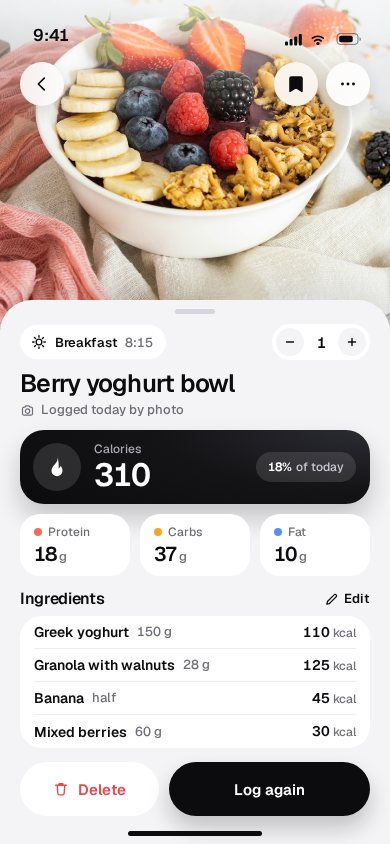
Morsel is a complete photo calorie tracker: a quiz onboarding that builds a daily plan, a paywall with a trial timeline, a home with the calories left ring and macro rings, a camera scan with detection labels on the plate, an editable result, barcode and describe a meal, saved meals, food search, progress with weight and weekly reports, streaks, reminders and settings. Soft grey and white with near black cards and coral, amber and blue macros.
| Detail | Value |
|---|---|
| Screen type | Detail |
| App | Morsel: AI calorie tracker |
| Category | Health and fitness |
| Design language | Minimal, light |
| Type | Geist |
| Colours | #f4f4f6 background, #ffffff surface, #0c0c0e text, #6e6e78 text-muted, #0c0c0e accent, #ffffff accent-contrast, #f26b5b secondary, #e6e6ea border, #e5484d danger |
What this screen says
- Breakfast8:15
- Berry yoghurt bowl
- Logged today by photo
- Calories310
- 18% of today
- Protein 18g
- Carbs 37g
- Fat 10g
- Ingredients Edit
- Greek yoghurt150 g 110kcal
- Granola with walnuts28 g 125kcal
- Bananahalf 45kcal
- Mixed berries60 g 30kcal
- Delete
- Log again
Around it in Morsel
More detail screens
- Locker Check in: Gym membership and class booking
- Dew Concern: AI skin scan and routine
- Cradle Sleep: Baby tracker
- Medly Suggested care: Doctor on call
- Donor Centre: Blood donation, counted drop by drop
- Unfold Class: Yoga and stretching
- Kilo Lift: Strength training log
- Cyra Day detail: Cycle tracker
- Harbor Entry: Therapy and mood
- Fasten Stages: Intermittent fasting
- Plate Food: Calorie and macro tracker
- Vita Test result: Personal health record
Every fitness app detail screen
What makes a good detail screen
- Lead with what identifies the item. A large image or title, the price or status, and the key facts at the top. People should know they are in the right place at a glance.
- Keep the main action visible. A sticky bottom button for Add to cart, Book or Play stays reachable while people scroll through details.
- Order information by importance. The facts that decide the choice come first; reviews, specifications and fine print further down.
- Use progressive disclosure. Long descriptions, specifications and policies can expand on tap rather than filling the screen.
The full detail screen guide and every example
Remix Morsel free: describe your own app and it is drawn in this design. Or get its files from $10: Figma, React Native, SwiftUI, Flutter and HTML.