Templates · Dashboard and stats screens · Food app · Menu
Menu Rewards screen
A dashboard screen from Menu, a food app template in a Minimal style. Screen 20 of 25.
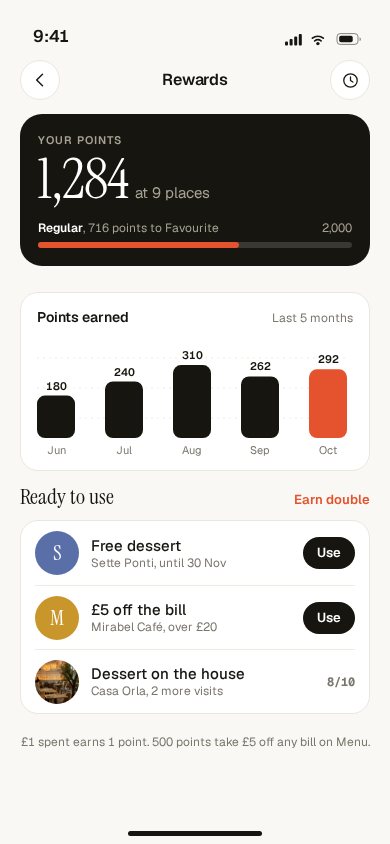
Menu is a complete scan, order and pay app: welcome, a camera that reads the table code, sign in, a table home with who has joined and what the kitchen is doing, a printed style menu, search with allergen filters, a dish with options and a note for the kitchen, the table's shared order, live order status, calling a server, the bill, splitting by items, tip, pay, a receipt, rewards, past visits, a Plus plan, notifications, profile and settings. Paper white and ink with tomato red and sage.
| Detail | Value |
|---|---|
| Screen type | Dashboard |
| App | Menu: Scan, order and pay at the table |
| Category | Food |
| Design language | Minimal, light |
| Type | Instrument Serif for headings, Geist for text |
| Colours | #faf8f4 background, #ffffff surface, #16150f text, #7a766c text-muted, #e4522e accent, #ffffff accent-contrast, #3f6f55 secondary, #ebe7de border, #d93b2b danger |
What this screen says
- Rewards
- Your points
- 1,284at 9 places
- Regular, 716 points to Favourite 2,000
- Points earned
- Last 5 months
- Ready to use
- Earn double
- Free dessertSette Ponti, until 30 Nov
- Use
- £5 off the billMirabel Café, over £20
- Dessert on the houseCasa Orla, 2 more visits
- £1 spent earns 1 point. 500 points take £5 off any bill on Menu.
Around it in Menu
More dashboard and stats screens
- Slice Rewards: Pizza ordering with a live tracker
- Crate Insights: Meal kits delivered weekly
- Dash Spends: Ten minute grocery delivery
- Aisle Spending: Shared grocery lists
- Mart Points: Supermarket app with loyalty and scan and go
- Rescue Impact: Surprise bags of surplus food
- Omakase Passport: Chef's counter reservations
- Lunchbox Balance: School lunch planner for parents
- Agave Insights: Cocktails and home bar
- Crock Insights: Fermentation and sourdough starter log
- Curbside Taste stats: Street food and food truck finder
- Forage Impact: Farmers market and veg box
Every food app dashboard screen
What makes a good dashboard screen
- One headline number. The figure that matters most, like balance, steps or revenue, large at the top with its change since the last period.
- Give numbers context. Compared with last week, against a goal or as a trend line. A number alone does not say if it is good.
- Pick simple charts. Bars for comparing periods, lines for trends and rings for progress toward a goal. Avoid charts that need a legend to read.
- Let people change the period. Day, week, month and year as a segmented control above the chart.
The full dashboard screen guide and every example
Remix Menu free: describe your own app and it is drawn in this design. Or get its files from $10: Figma, React Native, SwiftUI, Flutter and HTML.