Templates · Detail screens · Fitness app · Mend
Mend Exercise screen
A detail screen from Mend, a physio and rehab exercises app template in a Minimal style. Screen 7 of 25.
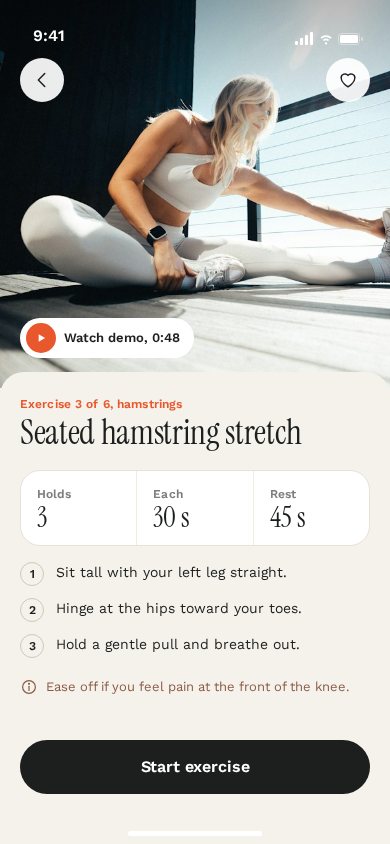
Mend is a complete physio and rehab app for recovering from an injury: welcome, an injury setup on a body map, sign in, a today screen with the range dial, a 16 week plan in phases, a session and exercise detail, a guided follow along video, a rest timer, a session log with pain and effort, a camera range measurement, progress with range and pain charts, a pain diary, an exercise library and body area list, the physio's profile, booking a clinic visit with confirmation, messages, notifications, a Plus plan, profile and settings. Warm linen and white with ink, serif numerals and one persimmon accent.
| Detail | Value |
|---|---|
| Screen type | Detail |
| App | Mend: Physio and rehab exercises |
| Category | Health and fitness |
| Design language | Minimal, light |
| Type | Instrument Serif for headings, Work Sans for text |
| Colours | #f5f2ec background, #ffffff surface, #1c1f1e text, #7b7f7a text-muted, #e8582c accent, #ffffff accent-contrast, #6f8fa6 secondary, #e7e2d8 border, #d9442b danger |
What this screen says
- Watch demo, 0:48
- Exercise 3 of 6, hamstrings
- Seated hamstring stretch
- Holds 3
- Each 30 s
- Rest 45 s
- 1Sit tall with your left leg straight.
- 2Hinge at the hips toward your toes.
- 3Hold a gentle pull and breathe out.
- Ease off if you feel pain at the front of the knee.
- Start exercise
Around it in Mend
More detail screens
- Morsel Result: AI calorie tracker
- Dew Concern: AI skin scan and routine
- Cradle Sleep: Baby tracker
- Medly Suggested care: Doctor on call
- Donor Centre: Blood donation, counted drop by drop
- Unfold Class: Yoga and stretching
- Kilo Lift: Strength training log
- Cyra Day detail: Cycle tracker
- Harbor Entry: Therapy and mood
- Fasten Stages: Intermittent fasting
- Plate Food: Calorie and macro tracker
- Vita Test result: Personal health record
Every fitness app detail screen
What makes a good detail screen
- Lead with what identifies the item. A large image or title, the price or status, and the key facts at the top. People should know they are in the right place at a glance.
- Keep the main action visible. A sticky bottom button for Add to cart, Book or Play stays reachable while people scroll through details.
- Order information by importance. The facts that decide the choice come first; reviews, specifications and fine print further down.
- Use progressive disclosure. Long descriptions, specifications and policies can expand on tap rather than filling the screen.
The full detail screen guide and every example
Remix Mend free: describe your own app and it is drawn in this design. Or get its files from $10: Figma, React Native, SwiftUI, Flutter and HTML.