Templates · Live tracking screens · Fitness app · Lull
Lull Wake up screen
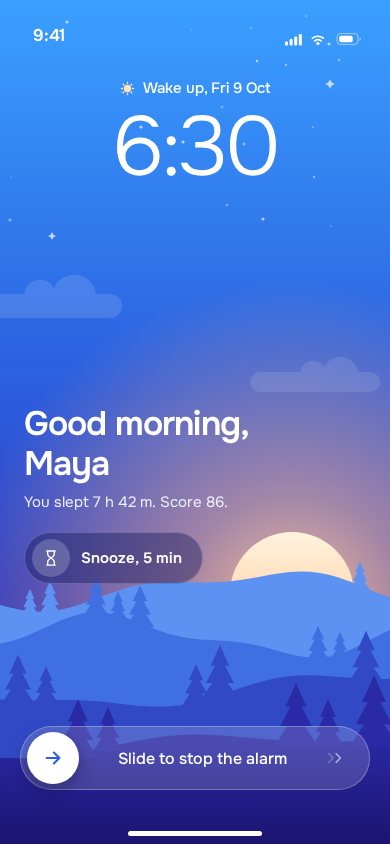
A tracking screen from Lull, a sleep sounds and meditation app template in a Dark-first style. Screen 19 of 25.
Lull is a complete sleep app: onboarding, goals, sign in, a home with recent and recommended sessions, a library of soundscapes, sleep stories and meditations, narrators, a course, a player with a sleep timer, breathing, a sound mixer with saved mixes, bedtime alarms with a sleep dial, bedtime and wake up screens, sleep stats, awards, a premium plan, profile and settings. Deep indigo and navy with violet, peach and illustrated night scenes.
| Detail | Value |
|---|---|
| Screen type | Tracking |
| App | Lull: Sleep sounds and meditation |
| Category | Health and fitness |
| Design language | Dark-first, dark |
| Type | Onest |
| Colours | #0c0524 background, #151a36 surface, #ffffff text, #9d98c2 text-muted, #7c3aed accent, #ffffff accent-contrast, #ff9d6c secondary, #262b52 border, #ff5d73 danger |
What this screen says
- Wake up, Fri 9 Oct
- Good morning,Maya
- You slept 7 h 42 m. Score 86.
- Snooze, 5 min
- Slide to stop the alarm
Around it in Lull
More live tracking screens
- Level Low alert: Glucose monitor companion
- Reformer In class: Pilates studio booking
- Sip Workout: Water intake and hydration
- Mend Rest: Physio and rehab exercises
- Tabata Get ready: HIIT interval timer
- Jab Live round: Boxing workouts with a smart bag
- Exhale Breathe: Breathwork sessions
- Bump Kick counter: Pregnancy week by week
- Locker Live class: Gym membership and class booking
- Dew Step: AI skin scan and routine
- Cradle Feeding timer: Baby tracker
- Donor Recovery: Blood donation, counted drop by drop
Every fitness app tracking screen
What makes a good live tracking screen
- The live number is the hero. Arrival time, pace, distance or time left, in large type at the top or centre.
- Show status in words. "Driver is 3 minutes away" or "Halfway there" alongside the map or chart.
- Make it readable while moving. Large numbers, high contrast and big buttons for pause, stop or call.
- Keep updates calm. Smooth movement on the map and steady numbers; jumpy updates feel broken.
The full live tracking screen guide and every example
Remix Lull free: describe your own app and it is drawn in this design. Or get its files from $10: Figma, React Native, SwiftUI, Flutter and HTML.