Templates · Success and confirmation screens · Education app · Lexis
Lexis Gift sent screen
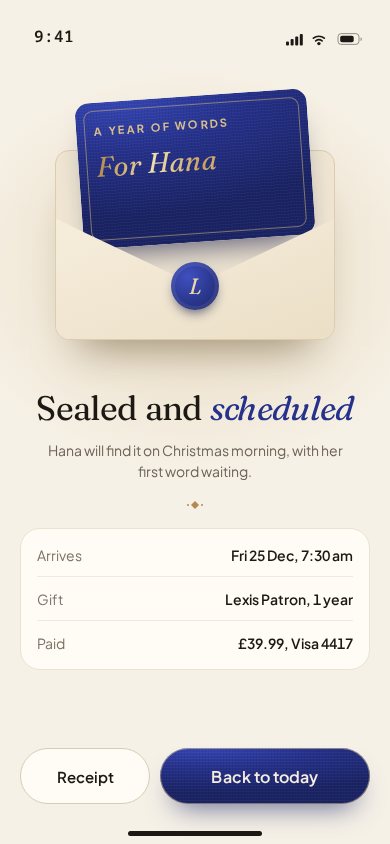
A success screen from Lexis, an education app template in a Luxury style. Screen 22 of 25.
Lexis is a complete word a day app: welcome, interests and sign in, a Today screen with the word of the day as a lapis bookcloth card, the full dictionary entry, a pronunciation coach with your voice against the reference, an etymology lineage, quotations in the wild, a quiz with results, writing your own sentence, spaced review with flashcards, your lexicon with an A to Z thumb index, search, curated collections, adding a word you met, progress, a Patron plan, gifting a year, notifications, profile and settings. Vellum and ivory with lapis bookcloth and gilt.
| Detail | Value |
|---|---|
| Screen type | Success |
| App | Lexis: A word a day |
| Category | Education |
| Design language | Luxury, light |
| Type | Fraunces for headings, Plus Jakarta Sans for text |
| Colours | #f6f1e7 background, #fffcf6 surface, #1c1813 text, #7b7265 text-muted, #25318a accent, #f6efe0 accent-contrast, #b48a4e secondary, #e6dccb border, #b3412f danger |
What this screen says
- A year of words For Hana
- Sealed and scheduled
- Hana will find it on Christmas morning, with her first word waiting.
- Arrives Fri 25 Dec, 7:30 am
- Gift Lexis Patron, 1 year
- Paid £39.99, Visa 4417
- Receipt
- Back to today
Around it in Lexis
More success and confirmation screens
- Wren Book finished: Early reading for kids
- Proof Set complete: Maths tutor that shows its working
- Skim Session complete: Speed reading trainer
- Terra Results: Geography and flags quiz
- Gambit Puzzle solved: Chess training
- Buzzer Results: Live trivia
- Homeroom Handed in: School, all on one page
- Parla Lesson complete: Language learning
- Recall Session done: Flashcards and spaced repetition
- Numo Level complete: Kids maths game
- Syntax Lesson complete: Learn to code
- Tuckin Goodnight: Bedtime stories for kids
Every education app success screen
What makes a good confirmation screen
- Confirm in the headline. "Payment sent", "Table booked for Friday at 8" or "Lesson complete" in plain words, with a clear success colour or icon.
- Repeat the key details. Amount, date, reference number or score, so people do not need to check elsewhere that the right thing happened.
- Say what happens next. When the order arrives, when the money lands, when the next lesson unlocks.
- Offer the next step. Track the order, add to calendar, share, or start the next lesson. One primary action and a way back home.
The full confirmation screen guide and every example
Remix Lexis free: describe your own app and it is drawn in this design. Or get its files from $10: Figma, React Native, SwiftUI, Flutter and HTML.