Templates · Detail screens · Food app · Ladle
Ladle Ingredients screen
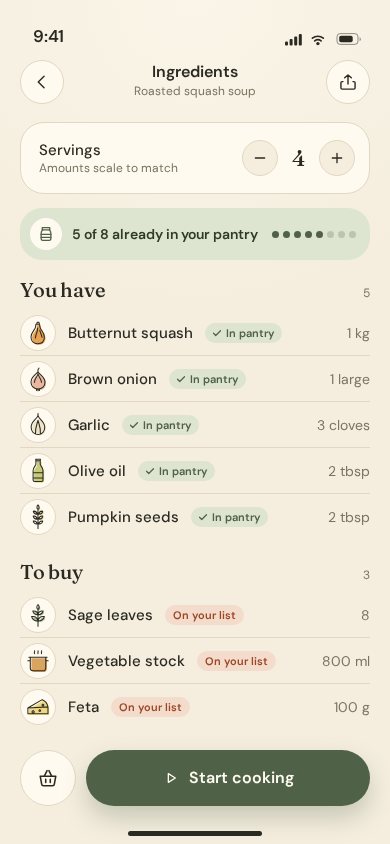
A detail screen from Ladle, a recipes and meal planning app template in a Minimal style. Screen 8 of 25.
Ladle is a complete recipe and meal planning app: onboarding and taste picks, sign in, a home with tonight's dinner, search, a recipe with scalable ingredients, a step by step cook mode with timers, a week planner, one shopping list sorted by aisle, a pantry with use it up ideas, collections, nutrition, a recipe editor, a plan, notifications, profile and settings. Cream, sage and terracotta with arch and circle photo crops.
| Detail | Value |
|---|---|
| Screen type | Detail |
| App | Ladle: Recipes and meal planning |
| Category | Food |
| Design language | Minimal, light |
| Type | DM Sans |
| Colours | #f5eedf background, #fffaf0 surface, #2b2a22 text, #857f6c text-muted, #4f6146 accent, #fffaf0 accent-contrast, #c4623c secondary, #e2d7c0 border, #b3402e danger |
What this screen says
- IngredientsRoasted squash soup
- ServingsAmounts scale to match
- 5 of 8 already in your pantry
- You have
- Butternut squash
- In pantry1 kg
- Brown onion
- In pantry1 large
- Garlic
- In pantry3 cloves
- Olive oil
- In pantry2 tbsp
- Pumpkin seeds
- To buy
- Sage leaves
- On your list8
- Vegetable stock
- On your list800 ml
- Feta
- On your list100 g
- Start cooking
Around it in Ladle
More detail screens
- Agave Recipe: Cocktails and home bar
- Crock Starter: Fermentation and sourdough starter log
- Curbside Truck: Street food and food truck finder
- Forage Produce: Farmers market and veg box
- Ember Probe: Smoker and grill thermometer
- Steep Tea: Tea brewing and tasting notes
- Brigade Ticket: Restaurant kitchen and line ops
- Nibs Result: Food allergy and label scanner
- Pantry Product: Grocery delivery
- Brewly Drink: Coffee ordering and loyalty
- Tabla Restaurant: Tables worth dressing for
- Corked Label match: Wine journal and cellar
What makes a good detail screen
- Lead with what identifies the item. A large image or title, the price or status, and the key facts at the top. People should know they are in the right place at a glance.
- Keep the main action visible. A sticky bottom button for Add to cart, Book or Play stays reachable while people scroll through details.
- Order information by importance. The facts that decide the choice come first; reviews, specifications and fine print further down.
- Use progressive disclosure. Long descriptions, specifications and policies can expand on tap rather than filling the screen.
The full detail screen guide and every example
Remix Ladle free: describe your own app and it is drawn in this design. Or get its files from $10: Figma, React Native, SwiftUI, Flutter and HTML.