Templates · List and feed screens · Lifestyle app · Kino
Kino New and upcoming screen
A list screen from Kino, a film and series streaming app template in a Dark-first style. Screen 12 of 25.
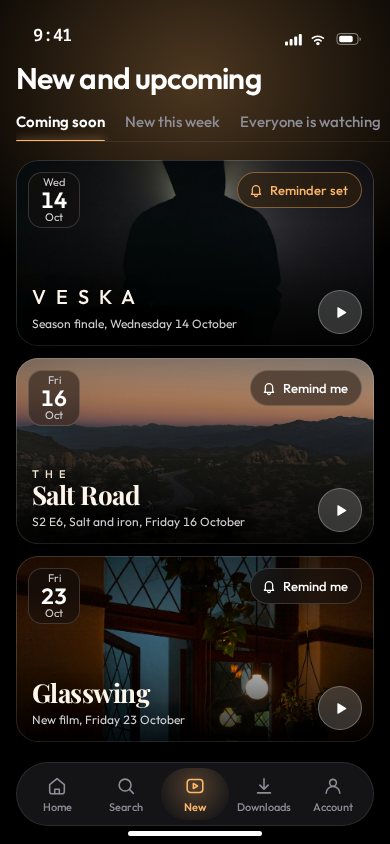
Kino is a complete streaming app: welcome, sign in, profiles, a home with a tall hero poster, continue watching and a top ten, title pages with episodes, a portrait player with audio and subtitles, search, genres, new and upcoming, downloads, my list, a vertical trailer feed, watch party, ratings, a kids profile, plans, payment, devices, parental controls, account and settings. True black with cinematic photography, white type and a sparing amber glow.
| Detail | Value |
|---|---|
| Screen type | List |
| App | Kino: Film and series streaming |
| Category | Lifestyle |
| Design language | Dark-first, dark |
| Type | Outfit |
| Colours | #000000 background, #141416 surface, #ffffff text, #a1a1aa text-muted, #ffb86b accent, #1a1206 accent-contrast, #f5efe6 secondary, #26262b border, #ff6b5e danger |
What this screen says
- New and upcoming
- Coming soon New this week Everyone is watching
- Wed14Oct
- Reminder set
- Veska
- Season finale, Wednesday 14 October
- Fri16Oct
- Remind me
- THESalt Road
- S2 E6, Salt and iron, Friday 16 October
- Fri23Oct
- Glasswing
- New film, Friday 23 October
- Home
- Search
- New
- Downloads
- Account
Around it in Kino
More list and feed screens
- Waybill Archive: Every parcel, read like its label
- Torque Service: The workshop manual for your own car
- Vetly Pets: Pet health record
- Stitch Projects: A knitting companion drawn as one big knitting chart
- Roost Shopping list: Your shared house, stuck to the fridge door
- Trellis Beds: Vegetable garden planner
- Grain Album: Camera and photo editor
- Posy Shop: Flower delivery and weekly stems
- Fern Reminders: Plant care
- Doorstep Results: Homes for sale and rent
- Rewear Offers: Secondhand fashion marketplace
- Laced Calendar: Sneaker drops and raffles
Every lifestyle app list screen
What makes a good list screen
- Show what people need to decide. Each row should carry just enough to choose: a title, one or two details and a status. Everything else belongs on the detail screen.
- Keep rows consistent. The same information in the same place on every row lets people scan down a column instead of reading each item.
- Group with headings. Dates, categories or status headings break long lists into chunks people can skip through.
- Make common actions quick. Swipe actions, a checkbox or a heart on the row save opening the item for small tasks.
The full list screen guide and every example
Remix Kino free: describe your own app and it is drawn in this design. Or get its files from $10: Figma, React Native, SwiftUI, Flutter and HTML.