Templates · Detail screens · Productivity app · Jot
Jot Table screen
A detail screen from Jot, a quick notes and checklists app template in a Minimal style. Screen 9 of 25.
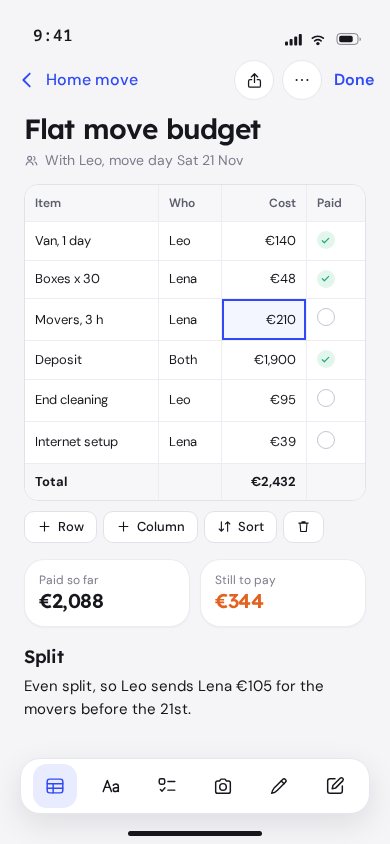
Jot is a complete everyday notes app: welcome, storage setup, sign in, a notes home with pinned cards and today's notes, folders with smart folders, a gallery folder, a note with a photo and checklist, a shared grocery checklist, a budget table, a sketch canvas with a tool tray, a document camera and the scanned result with found text, a format sheet, search that reaches inside tables and scans, tags, shared notes with live collaboration, sharing and an invite confirmation, a locked note, insights, notifications, a Plus plan, profile and settings. Cool paper grey and white with cobalt ink and a tangerine fold.
| Detail | Value |
|---|---|
| Screen type | Detail |
| App | Jot: Quick notes and checklists |
| Category | Productivity |
| Design language | Minimal, light |
| Type | Lexend for headings, DM Sans for text |
| Colours | #f5f5f8 background, #ffffff surface, #16161d text, #7c7d8c text-muted, #2f49f5 accent, #ffffff accent-contrast, #ff7a3d secondary, #ebebf1 border, #ec4f8b danger |
What this screen says
- Home move
- Done
- Flat move budget
- With Leo, move day Sat 21 Nov
- Item
- Who
- Cost
- Paid
- Van, 1 day
- Leo
- Boxes x 30
- Lena
- Movers, 3 h
- Deposit
- Both
- End cleaning
- Internet setup
- Total
- Row Column Sort
- Paid so far€2,088
- Still to pay€344
- Split
- Even split, so Leo sends Lena €105 for the movers before the 21st.
Around it in Jot
More detail screens
- Beacon Person: Find your devices and people
- Staffroom Approval: HR, payslips and time off
- Slot Meeting: Booking links and meeting scheduling
- Sheet Record: Spreadsheets and databases
- Tunnel Country: VPN and online privacy
- Ping Test details: Internet speed test
- Glance Product: Visual search with the camera
- Replay Video: Record and share screen videos
- Easel Retro template: Collaborative whiteboard
- Token Account: Two-factor codes and sign-in approvals
- Beam Transfer: Send big files
- Parchment Document: Documents, edit and share
Every productivity app detail screen
What makes a good detail screen
- Lead with what identifies the item. A large image or title, the price or status, and the key facts at the top. People should know they are in the right place at a glance.
- Keep the main action visible. A sticky bottom button for Add to cart, Book or Play stays reachable while people scroll through details.
- Order information by importance. The facts that decide the choice come first; reviews, specifications and fine print further down.
- Use progressive disclosure. Long descriptions, specifications and policies can expand on tap rather than filling the screen.
The full detail screen guide and every example
Remix Jot free: describe your own app and it is drawn in this design. Or get its files from $10: Figma, React Native, SwiftUI, Flutter and HTML.