Templates · Detail screens · Productivity app · Glossa
Glossa Word screen
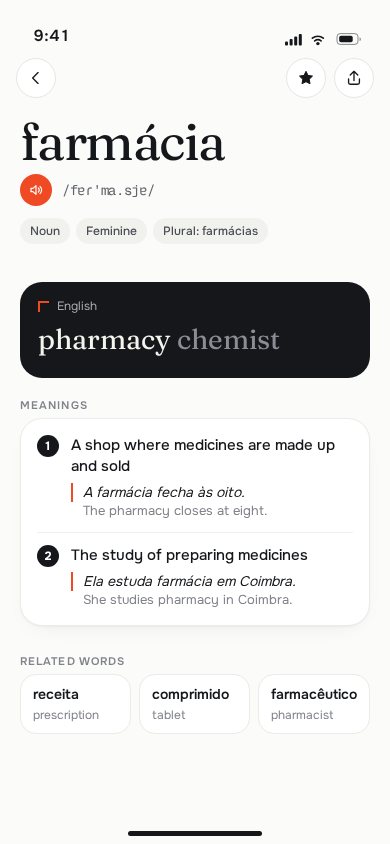
A detail screen from Glossa, a productivity app template in a Minimal style. Screen 14 of 25.
Glossa is a complete translation app: welcome, language setup, sign in, a translator home, a full result with alternatives and examples, a language picker, voice and face to face conversation, live camera translation and a scanned menu, history, saved phrases and a phrasebook, a dictionary word page, documents, offline languages, practice cards, monthly insights, a Pro plan with checkout and confirmation, notifications, profile and settings. Off white and ink with one vermilion accent.
| Detail | Value |
|---|---|
| Screen type | Detail |
| App | Glossa: Translate text, voice and camera |
| Category | Productivity |
| Design language | Minimal, light |
| Type | Fraunces for headings, Onest for text |
| Colours | #fbfbfa background, #ffffff surface, #f1f1ee surface-muted, #15171a text, #80838a text-muted, #ef4a23 accent, #fde8e1 accent-soft, #15171a secondary, #ebebe7 border, #1f9d6b success |
What this screen says
- farmácia
- /fɐɾˈma.sjɐ/
- Noun Feminine Plural: farmácias
- English
- pharmacy chemist
- Meanings
- A shop where medicines are made up and sold
- A farmácia fecha às oito.The pharmacy closes at eight.
- The study of preparing medicines
- Ela estuda farmácia em Coimbra.She studies pharmacy in Coimbra.
- Related words
- receitaprescription
- comprimidotablet
- farmacêuticopharmacist
Around it in Glossa
More detail screens
- Tunnel Country: VPN and online privacy
- Ping Test details: Internet speed test
- Glance Product: Visual search with the camera
- Replay Video: Record and share screen videos
- Easel Retro template: Collaborative whiteboard
- Token Account: Two-factor codes and sign-in approvals
- Beam Transfer: Send big files
- Parchment Document: Documents, edit and share
- Lectern Deck: Slides and presenter remote
- Ringer Call details: Phone, contacts and voicemail
- Pipeline Deal: Sales CRM on the road
- Aim Objective: Goals and key results
Every productivity app detail screen
What makes a good detail screen
- Lead with what identifies the item. A large image or title, the price or status, and the key facts at the top. People should know they are in the right place at a glance.
- Keep the main action visible. A sticky bottom button for Add to cart, Book or Play stays reachable while people scroll through details.
- Order information by importance. The facts that decide the choice come first; reviews, specifications and fine print further down.
- Use progressive disclosure. Long descriptions, specifications and policies can expand on tap rather than filling the screen.
The full detail screen guide and every example
Remix Glossa free: describe your own app and it is drawn in this design. Or get its files from $10: Figma, React Native, SwiftUI, Flutter and HTML.