Templates · Sign in and sign up screens · Lifestyle app · Gloss
Gloss Create account screen
A sign in screen from Gloss, a salon and spa booking app template in a Luxury style. Screen 3 of 25.
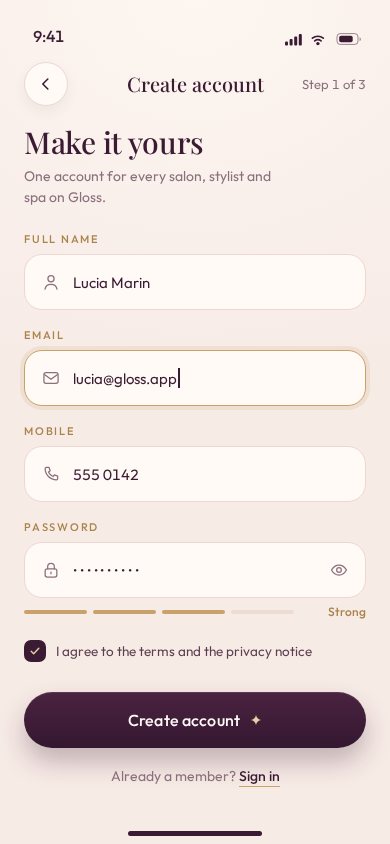
Gloss is a complete salon and spa booking app: welcome, sign in, a style quiz, a home with the next appointment, search, nearby salons, a salon page with services and stylists, time slots, booking review and confirmation, appointments, a lookbook of finished looks, reviews, loyalty rewards with a member card, a membership plan, notifications, profile and settings. Blush and ivory with deep plum, champagne gold hairlines and photos in arches.
| Detail | Value |
|---|---|
| Screen type | Sign in |
| App | Gloss: Salon and spa booking |
| Category | Lifestyle |
| Design language | Luxury, light |
| Type | Outfit |
| Colours | #f7ebe6 background, #fffaf6 surface, #3b1b33 text, #8a6f7d text-muted, #3b1b33 accent, #fffaf6 accent-contrast, #c8a26a secondary, #ecd8d0 border, #b8475a danger |
What this screen says
- Create account
- Step 1 of 3
- Make it yours
- One account for every salon, stylist and spa on Gloss.
- Full name
- Lucia Marin
- lucia@gloss.app
- Mobile
- Password
- ••••••••••
- Strong
- I agree to the terms and the privacy notice
- Already a member? Sign in
Around it in Gloss
More sign in and sign up screens
- Guardrail Sign in: Parental controls and screen time
- Collar Sign in: GPS pet tracker
- Postage Sign in: Send parcels and find drop-off points
- Specs Sign in: Glasses with virtual try-on
- Circuit Sign in: Electronics store with trade-in and repairs
- Provenance Sign in: Authenticated luxury resale
- Gavel Sign in: Live online auctions
- Tidy Sign in: Book home cleaners
- Dorm Sign in: Find student housing
- Hem Sign in: Tailoring and alterations, collected
- Lendly Sign in: Borrow things from neighbours
- Stub Sign in: Fan to fan ticket resale
Every lifestyle app sign in screen
What makes a good login screen
- Offer the fastest option first. Sign in with Apple, Google or a passkey takes one tap. If you support them, put them above the email form. Apple asks apps that use a third-party login like Google to also offer an equivalent privacy-focused option, such as Sign in with Apple.
- Separate sign in from sign up clearly. Use different headings and buttons, and a clear link to switch. People who already have an account should never end up creating a second one by accident.
- Use the right keyboard and autofill. Email fields should open the email keyboard and support password managers and one-time code autofill. Small details, big difference in how many people get through.
- Write errors that help. "That password doesn't match this email" is better than "Error 401". Keep what people typed so they only fix the part that was wrong.
The full login screen guide and every example
Remix Gloss free: describe your own app and it is drawn in this design. Or get its files from $10: Figma, React Native, SwiftUI, Flutter and HTML.