Templates · Booking and checkout screens · Lifestyle app · Gloss
Gloss Review booking screen
A checkout screen from Gloss, a salon and spa booking app template in a Luxury style. Screen 13 of 25.
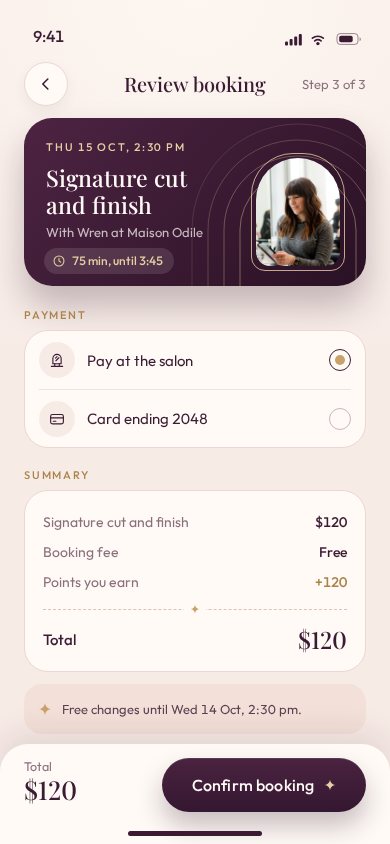
Gloss is a complete salon and spa booking app: welcome, sign in, a style quiz, a home with the next appointment, search, nearby salons, a salon page with services and stylists, time slots, booking review and confirmation, appointments, a lookbook of finished looks, reviews, loyalty rewards with a member card, a membership plan, notifications, profile and settings. Blush and ivory with deep plum, champagne gold hairlines and photos in arches.
| Detail | Value |
|---|---|
| Screen type | Checkout |
| App | Gloss: Salon and spa booking |
| Category | Lifestyle |
| Design language | Luxury, light |
| Type | Outfit |
| Colours | #f7ebe6 background, #fffaf6 surface, #3b1b33 text, #8a6f7d text-muted, #3b1b33 accent, #fffaf6 accent-contrast, #c8a26a secondary, #ecd8d0 border, #b8475a danger |
What this screen says
- Review booking
- Step 3 of 3
- Thu 15 Oct, 2:30 pm
- Signature cut
- and finish
- With Wren at Maison Odile
- 75 min, until 3:45
- Payment
- Pay at the salon
- Card ending 2048
- Summary
- Signature cut and finish$120
- Booking feeFree
- Points you earn+120
- Total$120
- Free changes until Wed 14 Oct, 2:30 pm.
- Total
- Confirm booking
Around it in Gloss
More booking and checkout screens
- Blush Bag: Beauty and makeup shopping
- Flatpack Cart: Furniture store with room previews
- Column Checkout: Newsletters and independent writers
- Fetch Book: Dog walkers and pet sitters
- Forecourt Reserve: Buy and sell used cars
- Tower Checkout: Mobile plan, data and bills
- Haul Cart: Bargain fashion and finds
- Muse Checkout: AI image studio
- Admit Tickets: Events and tickets near you
- Arcade Cart: Game store, library and friends
- Natal Book a reading: Birth charts and daily astrology
- Sillage Bag: Fragrance wardrobe
Every lifestyle app checkout screen
What makes a good checkout screen
- Show the total early and honestly. Taxes, delivery and service fees should appear before the last step. A higher total on the final screen feels like a trick.
- Offer wallet payments. Apple Pay and Google Pay skip card typing entirely. Show them first when they are available.
- Ask for the minimum. Only the fields needed to deliver or book. Save details for next time.
- Let people review before paying. A clear summary of items, dates, address and price, with each part editable without starting over.
The full checkout screen guide and every example
Remix Gloss free: describe your own app and it is drawn in this design. Or get its files from $10: Figma, React Native, SwiftUI, Flutter and HTML.