Templates · List and feed screens · Lifestyle app · Gavel
Gavel Auction screen
A list screen from Gavel, a live online auctions app template in a Brutalist style. Screen 6 of 25.
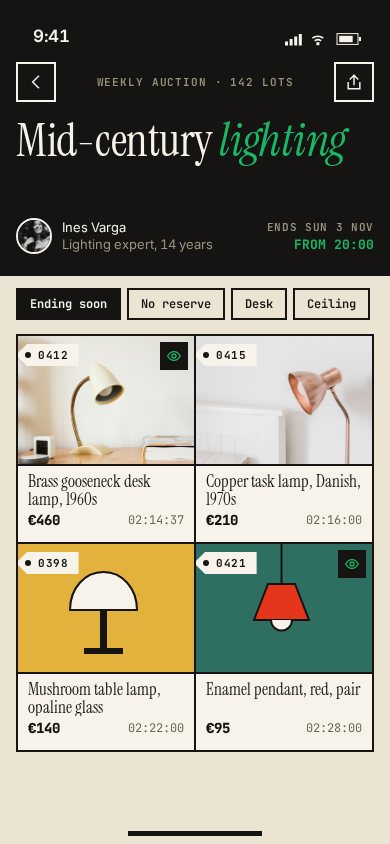
Gavel is a complete online auction house: welcome, interests and sign in, a home with tonight's closing lot, the week's curated auctions, an auction's lots, search, a lot page with the expert estimate, a condition report and bid history, live bidding with an outbid alert, a max bid keypad and a bid placed screen, watchlist and my bids, a won lot checkout with buyer protection, payment confirmed and shipment tracking, selling a lot with expert review, seller payouts, notifications, a membership plan, profile and settings. Manila paper, black ink and a bid green.
| Detail | Value |
|---|---|
| Screen type | List |
| App | Gavel: Live online auctions |
| Category | Lifestyle |
| Design language | Brutalist, light |
| Type | Instrument Serif for headings, Inter for text |
| Colours | #ebe4d3 background, #f7f3ea surface, #151412 text, #6e6757 text-muted, #19b866 accent, #151412 accent-contrast, #151412 secondary, #cfc6b1 border, #e5361b danger |
What this screen says
- Weekly auction · 142 lots
- Mid-century lighting
- Ines VargaLighting expert, 14 years
- ENDS SUN 3 NOV FROM 20:00
- Ending soon No reserve Desk Ceiling
- Brass gooseneck desk lamp, 1960s
- Copper task lamp, Danish, 1970s
- Mushroom table lamp, opaline glass
- Enamel pendant, red, pair
Around it in Gavel
More list and feed screens
- Fern Reminders: Plant care
- Doorstep Results: Homes for sale and rent
- Rewear Offers: Secondhand fashion marketplace
- Laced Calendar: Sneaker drops and raffles
- Gloss Salons: Salon and spa booking
- Vow Notifications: Wedding planner
- Drizzle 10 day: Weather with living skies
- Byline Sections: Daily news reader
- Shelf Notifications: Reading tracker and book club
- Marquee Reviews: Cinema tickets and watchlist
- Handy Choose a pro: Home services
- Tasker Choose tasker: Book and do local odd jobs
Every lifestyle app list screen
What makes a good list screen
- Show what people need to decide. Each row should carry just enough to choose: a title, one or two details and a status. Everything else belongs on the detail screen.
- Keep rows consistent. The same information in the same place on every row lets people scan down a column instead of reading each item.
- Group with headings. Dates, categories or status headings break long lists into chunks people can skip through.
- Make common actions quick. Swipe actions, a checkbox or a heart on the row save opening the item for small tasks.
The full list screen guide and every example
Remix Gavel free: describe your own app and it is drawn in this design. Or get its files from $10: Figma, React Native, SwiftUI, Flutter and HTML.