Templates · List and feed screens · Lifestyle app · Flatpack
Flatpack Notifications screen
A list screen from Flatpack, a furniture store with room previews app template in a Minimal style. Screen 23 of 25.
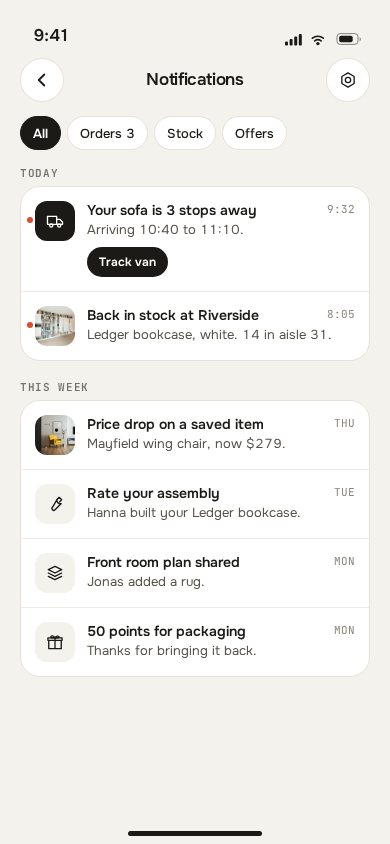
Flatpack is a complete furniture store app: welcome, home store and sign in, a home feed of rooms, a shoppable room with hotspots, search, results with filters, a product page with colours, a measured drawing, a camera room preview, in-store stock with aisle and bin, a store map with a walking route, a shopping list sorted by aisle, cart, delivery slots, assembly booking, payment, confirmation, live delivery tracking, a room planner, rewards, a membership plan, notifications, profile and settings. Warm paper and white with graphite ink and a tomato red for measurements.
| Detail | Value |
|---|---|
| Screen type | List |
| App | Flatpack: Furniture store with room previews |
| Category | Lifestyle |
| Design language | Minimal, light |
| Type | JetBrains Mono for headings, Onest for text |
| Colours | #f4f2ed background, #ffffff surface, #ebe7df surface-alt, #1b1a17 text, #77736a text-muted, #e2492d accent, #2f7a4b success, #b7791f warning, #e6e2d9 border |
What this screen says
- Notifications
- All Orders 3 Stock Offers
- TODAY
- Your sofa is 3 stops away
- Arriving 10:40 to 11:10. Track van
- Back in stock at Riverside
- Ledger bookcase, white. 14 in aisle 31.
- THIS WEEK
- Price drop on a saved item
- Mayfield wing chair, now $279.
- THU
- Rate your assembly
- Hanna built your Ledger bookcase.
- TUE
- Front room plan shared
- Jonas added a rug.
- MON
- 50 points for packaging
- Thanks for bringing it back.
Around it in Flatpack
More list and feed screens
- Rewear Offers: Secondhand fashion marketplace
- Laced Calendar: Sneaker drops and raffles
- Gloss Salons: Salon and spa booking
- Vow Notifications: Wedding planner
- Drizzle 10 day: Weather with living skies
- Byline Sections: Daily news reader
- Shelf Notifications: Reading tracker and book club
- Marquee Reviews: Cinema tickets and watchlist
- Handy Choose a pro: Home services
- Tasker Choose tasker: Book and do local odd jobs
- Toolbox Questions: Hardware store and project lists
- Brief Morning brief: News in sixty words
Every lifestyle app list screen
What makes a good list screen
- Show what people need to decide. Each row should carry just enough to choose: a title, one or two details and a status. Everything else belongs on the detail screen.
- Keep rows consistent. The same information in the same place on every row lets people scan down a column instead of reading each item.
- Group with headings. Dates, categories or status headings break long lists into chunks people can skip through.
- Make common actions quick. Swipe actions, a checkbox or a heart on the row save opening the item for small tasks.
The full list screen guide and every example
Remix Flatpack free: describe your own app and it is drawn in this design. Or get its files from $10: Figma, React Native, SwiftUI, Flutter and HTML.