Templates · Sign in and sign up screens · Fitness app · Fasten
Fasten Create account screen
A sign in screen from Fasten, an intermittent fasting app template in a Dark-first style. Screen 3 of 25.
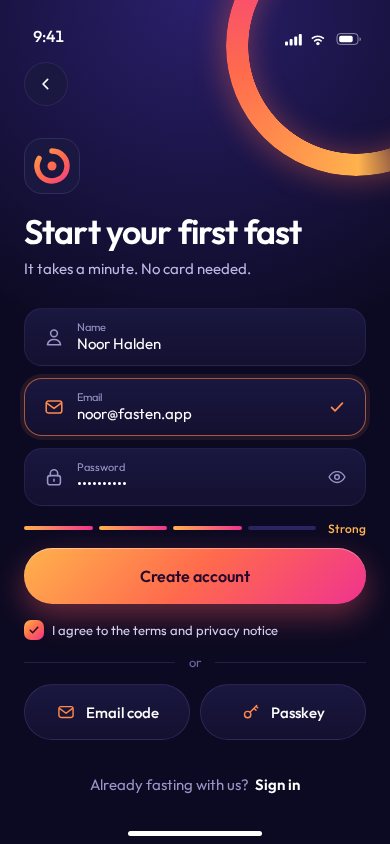
Fasten is a complete intermittent fasting app: welcome, sign in, a code, a goal and an eating window, a home built around a glowing timer ring, the stages of the fast on a timeline, ending a fast and its summary, fasting plans, a meal log, water, a weight trend, history on a calendar, insights, notifications, a Plus plan, profile and settings. One orange to magenta gradient marks the fast itself: the ring, the stage you are in and every main button.
| Detail | Value |
|---|---|
| Screen type | Sign in |
| App | Fasten: Intermittent fasting |
| Category | Health and fitness |
| Design language | Dark-first, dark |
| Type | Outfit |
| Colours | #0c0a22 background, #17143a surface, #ffffff text, #9a95c9 text-muted, #ff8a4c accent, #25082b accent-contrast, #f0338f secondary, #2a2658 border, #ff5d73 danger |
What this screen says
- Start your first fast
- It takes a minute. No card needed.
- Name
- Noor Halden
- noor@fasten.app
- Password
- ••••••••••
- Strong
- Create account
- I agree to the terms and privacy notice
- or
- Email code
- Passkey
- Already fasting with us? Sign in
Around it in Fasten
More sign in and sign up screens
- Harbor Sign in: Therapy and mood
- Plate Sign in: Calorie and macro tracker
- Vita Sign in: Personal health record
- Forge Sign in: AI fitness and nutrition
- Lull Sign in: Sleep sounds and meditation
- Pace Sign in: Fitness tracker
- Flexpass Sign in: One membership, many studios
- Clinic Sign in: Find and book doctors
- Careline Sign in: Care for an ageing parent
- Velo Sign in: Live and on-demand indoor cycling
- Vantage Sign in: Sports watch companion
- Labwork Sign in: Book blood tests and see results
Every fitness app sign in screen
What makes a good login screen
- Offer the fastest option first. Sign in with Apple, Google or a passkey takes one tap. If you support them, put them above the email form. Apple asks apps that use a third-party login like Google to also offer an equivalent privacy-focused option, such as Sign in with Apple.
- Separate sign in from sign up clearly. Use different headings and buttons, and a clear link to switch. People who already have an account should never end up creating a second one by accident.
- Use the right keyboard and autofill. Email fields should open the email keyboard and support password managers and one-time code autofill. Small details, big difference in how many people get through.
- Write errors that help. "That password doesn't match this email" is better than "Error 401". Keep what people typed so they only fix the part that was wrong.
The full login screen guide and every example
Remix Fasten free: describe your own app and it is drawn in this design. Or get its files from $10: Figma, React Native, SwiftUI, Flutter and HTML.