Templates · List and feed screens · Travel app · Fairground
Fairground Notifications screen
A list screen from Fairground, a travel app template in a Playful style. Screen 23 of 25.
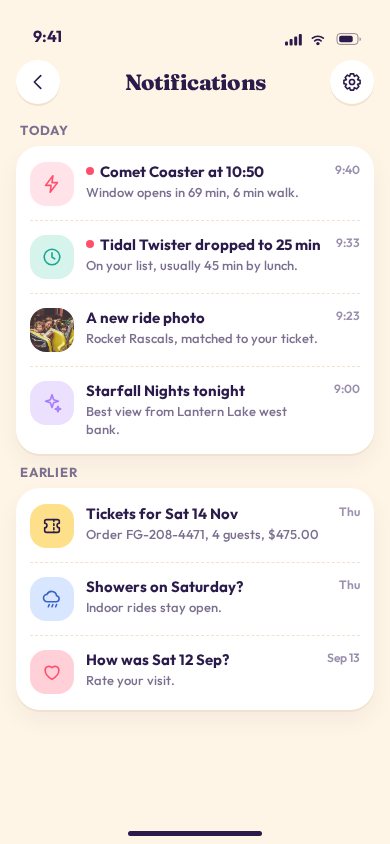
Fairground is a complete theme park app: welcome, sign in, a home with today's hours, the next return time and the shortest waits, an illustrated park map with live wait bubbles, a wait times list, ride details, a virtual queue with a return time pass, the show schedule, day tickets with a price calendar, checkout and a booked screen, ticket wallet and a scannable pass, mobile food ordering from menu to pickup, ride photos, a my day plan, a Plus upgrade, notifications, profile and settings. Popcorn cream and white with cherry, plum, lagoon teal and sunshine.
| Detail | Value |
|---|---|
| Screen type | List |
| App | Fairground: Theme park tickets, wait times and map |
| Category | Travel |
| Design language | Playful, light |
| Type | Fraunces for headings, Outfit for text |
| Colours | #fff5e6 background, #ffffff surface, #2a1b4a text, #7a6f8f text-muted, #ff4f6d accent, #ffffff accent-contrast, #14a891 secondary, #f0e2cc border, #ff4f6d danger |
What this screen says
- Notifications
- Today
- Comet Coaster at 10:50
- Window opens in 69 min, 6 min walk.
- Tidal Twister dropped to 25 min
- On your list, usually 45 min by lunch.
- A new ride photo
- Rocket Rascals, matched to your ticket.
- Starfall Nights tonight
- Best view from Lantern Lake west bank.
- Earlier
- Tickets for Sat 14 Nov
- Order FG-208-4471, 4 guests, $475.00
- Thu
- Showers on Saturday?
- Indoor rides stay open.
- How was Sat 12 Sep?
- Rate your visit.
- Sep 13
Around it in Fairground
More list and feed screens
- Spoke Journeys: Bike sharing
- Navara Trips: Yacht charter
- Voya Results: Travel booking
- Wheelhouse Trips: Driver app for ride hailing
- Fuelup Fuel prices: Pay at the pump and car wash
- Omnia Mart: Super app for rides, food and payments
- Staya Reviews: Homes and stays from local hosts
- Lodge Reviews: Hotels, deals and reservations
- Fare Results: Flight search and price alerts
- Rove Reviews: Reviews and things to do
- Ignition Results: Car rental from local hosts
- Contrail Flights: Airline booking, check-in and boarding
What makes a good list screen
- Show what people need to decide. Each row should carry just enough to choose: a title, one or two details and a status. Everything else belongs on the detail screen.
- Keep rows consistent. The same information in the same place on every row lets people scan down a column instead of reading each item.
- Group with headings. Dates, categories or status headings break long lists into chunks people can skip through.
- Make common actions quick. Swipe actions, a checkbox or a heart on the row save opening the item for small tasks.
The full list screen guide and every example
Remix Fairground free: describe your own app and it is drawn in this design. Or get its files from $10: Figma, React Native, SwiftUI, Flutter and HTML.