Templates · List and feed screens · Lifestyle app · Fade
Fade Notifications screen
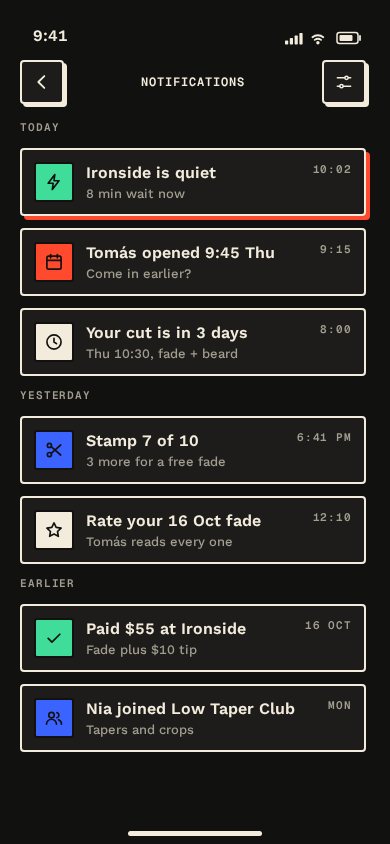
A list screen from Fade, a barber booking app template in a Neubrutalism style. Screen 23 of 25.
Fade is a complete barber booking app: welcome, sign in and a code, a home that knows when you are due, a map of shops nearby, search, a shop with its chairs and menu, a barber with a portfolio, a lookbook and a fade map for each style, services, a time picker, cut notes with guard numbers, review and a booked ticket, bookings and an appointment, a live walk in queue, rating with a tip, a cut log, a punch card, Fade Pass, notifications, profile and settings. Ink black, cream, pole red and cobalt.
| Detail | Value |
|---|---|
| Screen type | List |
| App | Fade: Barber booking |
| Category | Lifestyle |
| Design language | Neubrutalism, dark |
| Type | Oswald for headings, Work Sans for text |
| Colours | #111110 background, #1d1c1a surface, #f3ecdd text, #a39d90 text-muted, #ff4a2e accent, #111110 accent-contrast, #3b63ff secondary, #f3ecdd border, #3fdc9a success |
What this screen says
- Notifications
- Today
- Ironside is quiet
- 8 min wait now
- Tomás opened 9:45 Thu
- Come in earlier?
- Your cut is in 3 days
- Thu 10:30, fade + beard
- Yesterday
- Stamp 7 of 10
- 3 more for a free fade
- 6:41 PM
- Rate your 16 Oct fade
- Tomás reads every one
- Earlier
- Paid $55 at Ironside
- Fade plus $10 tip
- 16 Oct
- Nia joined Low Taper Club
- Tapers and crops
- Mon
Around it in Fade
More list and feed screens
- Roost Shopping list: Your shared house, stuck to the fridge door
- Trellis Beds: Vegetable garden planner
- Grain Album: Camera and photo editor
- Posy Shop: Flower delivery and weekly stems
- Fern Reminders: Plant care
- Doorstep Results: Homes for sale and rent
- Rewear Offers: Secondhand fashion marketplace
- Laced Calendar: Sneaker drops and raffles
- Gloss Salons: Salon and spa booking
- Vow Notifications: Wedding planner
- Drizzle 10 day: Weather with living skies
- Byline Sections: Daily news reader
Every lifestyle app list screen
What makes a good list screen
- Show what people need to decide. Each row should carry just enough to choose: a title, one or two details and a status. Everything else belongs on the detail screen.
- Keep rows consistent. The same information in the same place on every row lets people scan down a column instead of reading each item.
- Group with headings. Dates, categories or status headings break long lists into chunks people can skip through.
- Make common actions quick. Swipe actions, a checkbox or a heart on the row save opening the item for small tasks.
The full list screen guide and every example
Remix Fade free: describe your own app and it is drawn in this design. Or get its files from $10: Figma, React Native, SwiftUI, Flutter and HTML.