Templates · List and feed screens · Social app · Facet
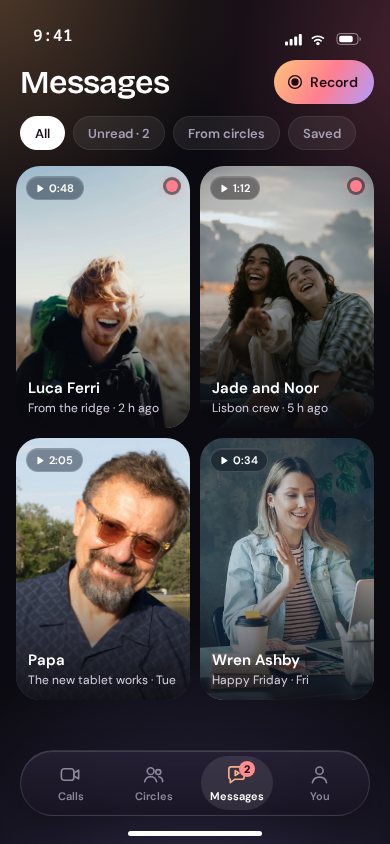
Facet Messages screen
A list screen from Facet, a social app template in a Glass style. Screen 18 of 25.
Facet is a complete video calling app for the people you love: welcome, phone sign in and a code, a calls home with favourites and an upcoming family call, new call, a contact with local time and shared history, ringing, an incoming call, a one to one call with live captions, a group call that spotlights the speaker, effects and backgrounds, share screen, watch together, circles, call links, video messages with recording and playback, a call summary, weekly call time, a Plus plan, your profile and settings. Plum black glass with an apricot to lilac prism.
| Detail | Value |
|---|---|
| Screen type | List |
| App | Facet: Video calls with family and friends |
| Category | Social |
| Design language | Glass, dark |
| Type | Bricolage Grotesque for headings, DM Sans for text |
| Colours | #0b0a10 background, #1a1622 surface, #ffffff text, #a59fb4 text-muted, #ff7f8f accent, #1c0c16 accent-contrast, #ffc27a secondary, #2a2433 border, #4fe3a1 success, #ff3b4f danger |
What this screen says
- Messages
- Record
- All Unread · 2 From circles Saved
- Luca Ferri
- From the ridge · 2 h ago
- Jade and Noor
- Lisbon crew · 5 h ago
- Papa
- The new tablet works · Tue
- Wren Ashby
- Happy Friday · Fri
- Calls
- Circles
- Messages 2
- You
Around it in Facet
More list and feed screens
- Banter New chat: Live messenger
- Natter Start new: Minimal messenger
- Nearly Crossed paths: Dating by crossed paths
- Linkup Skills: Professional network and jobs
- Quorum Comments: Questions and expert answers
- Backer Community: Support creators with memberships
- Pledge Rewards: Back creative projects
- Civic My requests: Report issues and city services
- Guild Messages: Community servers with voice and text chat
- Parrot Calls: Private messaging, groups and calls
- Carrier Channels: Cloud messaging with channels
- Vista Comments: Photos, stories and reels
What makes a good list screen
- Show what people need to decide. Each row should carry just enough to choose: a title, one or two details and a status. Everything else belongs on the detail screen.
- Keep rows consistent. The same information in the same place on every row lets people scan down a column instead of reading each item.
- Group with headings. Dates, categories or status headings break long lists into chunks people can skip through.
- Make common actions quick. Swipe actions, a checkbox or a heart on the row save opening the item for small tasks.
The full list screen guide and every example
Remix Facet free: describe your own app and it is drawn in this design. Or get its files from $10: Figma, React Native, SwiftUI, Flutter and HTML.