Templates · List and feed screens · Food app · Ember
Ember Shop screen
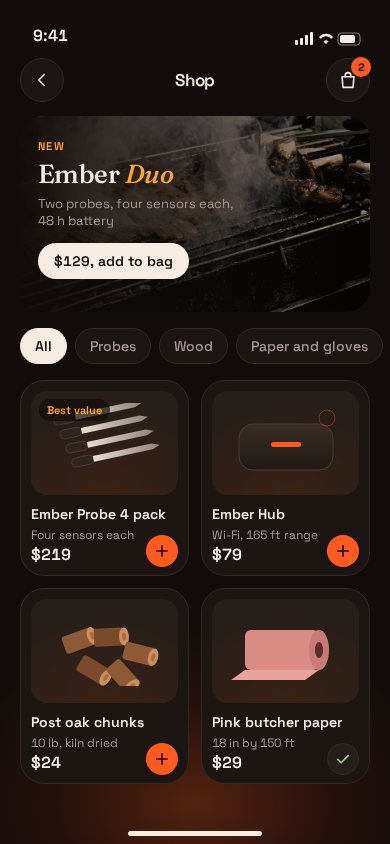
A list screen from Ember, a smoker and grill thermometer app template in a Dark-first style. Screen 19 of 25.
Ember is a complete wireless meat thermometer: welcome, pairing the probes, sign in, a home with the cook in progress, a live cook dial with pit and meat temperatures, a single probe with its four sensors, the cook graph with the stall and the wrap, alerts, starting a new cook, cut guides and a recipe, a rest timer, a finished cook, the cook log and a recap, pit stats, devices, a shop with checkout and an order placed, a Pro plan, notifications, profile and settings. Soot black and charcoal with an ember to amber glow.
| Detail | Value |
|---|---|
| Screen type | List |
| App | Ember: Smoker and grill thermometer |
| Category | Food |
| Design language | Dark-first, dark |
| Type | Fraunces for headings, Space Grotesk for text |
| Colours | #120d0a background, #1c1612 surface, #f7ece1 text, #a8978a text-muted, #ff5b1f accent, #1a0b04 accent-contrast, #ffa62b secondary, #33291f border, #8ab4c8 info, #9ed27a success |
What this screen says
- Shop
- New
- Ember Duo
- Two probes, four sensors each, 48 h battery
- $129, add to bag
- All Probes Wood Paper and gloves
- Best value
- Ember Probe 4 packFour sensors each$219
- Ember HubWi-Fi, 165 ft range$79
- Post oak chunks10 lb, kiln dried$24
- Pink butcher paper18 in by 150 ft$29
Around it in Ember
More list and feed screens
- Queue Drinks: Join the waitlist from anywhere
- Nosh Menu: Local restaurant reviews
- Buns Deals: Burger chain ordering and deals
- Slice Menu: Pizza ordering with a live tracker
- Crate Menu: Meal kits delivered weekly
- Dash Aisle: Ten minute grocery delivery
- Aisle Weekly shop: Shared grocery lists
- Menu: Scan, order and pay at the table
- Mart Weekly ad: Supermarket app with loyalty and scan and go
- Rescue Bakeries: Surprise bags of surplus food
- Omakase Reservations: Chef's counter reservations
- Lunchbox Week plan: School lunch planner for parents
What makes a good list screen
- Show what people need to decide. Each row should carry just enough to choose: a title, one or two details and a status. Everything else belongs on the detail screen.
- Keep rows consistent. The same information in the same place on every row lets people scan down a column instead of reading each item.
- Group with headings. Dates, categories or status headings break long lists into chunks people can skip through.
- Make common actions quick. Swipe actions, a checkbox or a heart on the row save opening the item for small tasks.
The full list screen guide and every example
Remix Ember free: describe your own app and it is drawn in this design. Or get its files from $10: Figma, React Native, SwiftUI, Flutter and HTML.