Templates · Detail screens · Food app · Ember
Ember Cut guide screen
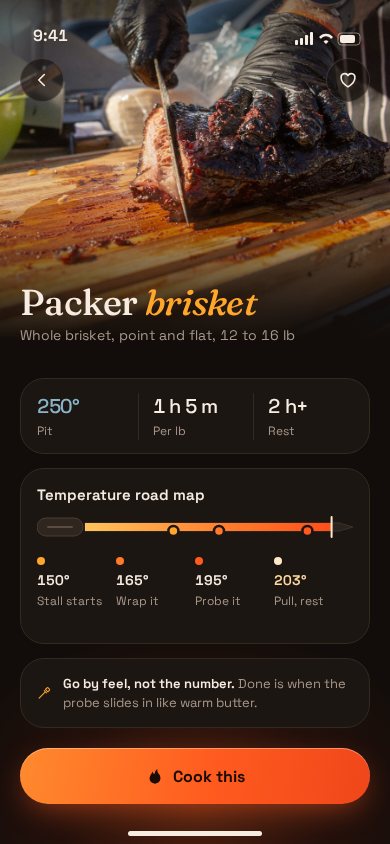
A detail screen from Ember, a smoker and grill thermometer app template in a Dark-first style. Screen 11 of 25.
Ember is a complete wireless meat thermometer: welcome, pairing the probes, sign in, a home with the cook in progress, a live cook dial with pit and meat temperatures, a single probe with its four sensors, the cook graph with the stall and the wrap, alerts, starting a new cook, cut guides and a recipe, a rest timer, a finished cook, the cook log and a recap, pit stats, devices, a shop with checkout and an order placed, a Pro plan, notifications, profile and settings. Soot black and charcoal with an ember to amber glow.
| Detail | Value |
|---|---|
| Screen type | Detail |
| App | Ember: Smoker and grill thermometer |
| Category | Food |
| Design language | Dark-first, dark |
| Type | Fraunces for headings, Space Grotesk for text |
| Colours | #120d0a background, #1c1612 surface, #f7ece1 text, #a8978a text-muted, #ff5b1f accent, #1a0b04 accent-contrast, #ffa62b secondary, #33291f border, #8ab4c8 info, #9ed27a success |
What this screen says
- Packer brisket
- Whole brisket, point and flat, 12 to 16 lb
- 250°Pit
- 1 h 5 mPer lb
- 2 h+Rest
- Temperature road map
- 150°Stall starts
- 165°Wrap it
- 195°Probe it
- 203°Pull, rest
- Go by feel, not the number. Done is when the probe slides in like warm butter.
- Cook this
Around it in Ember
More detail screens
- Tabla Restaurant: Tables worth dressing for
- Corked Label match: Wine journal and cellar
- Crumb Bake: Neighbourhood bakery
- Tiffin Restaurant: Food delivery
- Courier Offer: Food delivery driver app
- Picker Batch offer: Grocery shopper app
- Queue Spot: Join the waitlist from anywhere
- Nosh Restaurant: Local restaurant reviews
- Buns Item: Burger chain ordering and deals
- Slice Pizza: Pizza ordering with a live tracker
- Crate Recipe: Meal kits delivered weekly
- Dash Product: Ten minute grocery delivery
What makes a good detail screen
- Lead with what identifies the item. A large image or title, the price or status, and the key facts at the top. People should know they are in the right place at a glance.
- Keep the main action visible. A sticky bottom button for Add to cart, Book or Play stays reachable while people scroll through details.
- Order information by importance. The facts that decide the choice come first; reviews, specifications and fine print further down.
- Use progressive disclosure. Long descriptions, specifications and policies can expand on tap rather than filling the screen.
The full detail screen guide and every example
Remix Ember free: describe your own app and it is drawn in this design. Or get its files from $10: Figma, React Native, SwiftUI, Flutter and HTML.