Templates · Dashboard and stats screens · Social app · Duo
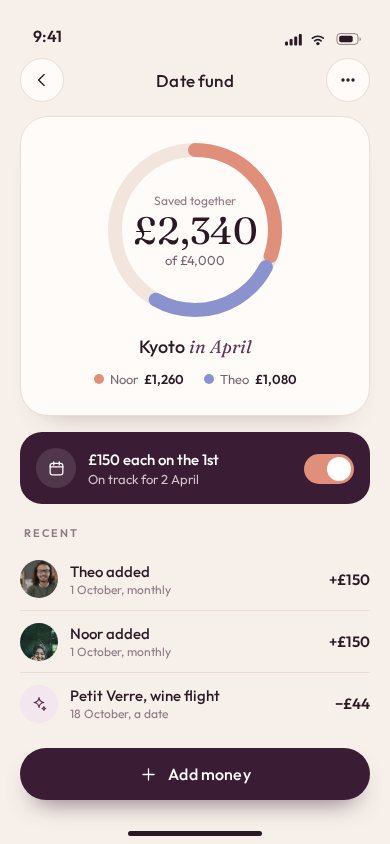
Duo Date fund screen
A dashboard screen from Duo, a social app template in a Luxury style. Screen 21 of 25.
Duo is a complete app for two: welcome, pairing with an invite code and sign in, a home with your days together, today's question and both moods, the question and both answers, a shared calendar that finds when you are both free, date ideas you both matched, an idea, planning a date, booking a table and the confirmation, live meet up tracking, memories and a single memory, an animated year recap, a love note, insights, milestones, a bucket list, a shared date fund, a membership plan, notifications, your couple profile and settings. Porcelain, aubergine, rosé and dusk.
| Detail | Value |
|---|---|
| Screen type | Dashboard |
| App | Duo: An app for two |
| Category | Social |
| Design language | Luxury, light |
| Type | Fraunces for headings, Outfit for text |
| Colours | #f7f0ea background, #fffbf8 surface, #2a1825 text, #8c7682 text-muted, #3a1c34 accent, #ffffff accent-contrast, #e08f7b secondary, #ecdcd2 border, #c4553f danger |
What this screen says
- Date fund
- Saved together £2,340of £4,000
- Kyoto in April
- Noor £1,260 Theo £1,080
- £150 each on the 1st
- On track for 2 April
- Recent
- Theo added
- 1 October, monthly
- Noor added
- Petit Verre, wine flight
- 18 October, a date
- −£44
- Add money
Around it in Duo
More dashboard and stats screens
- Nearly Insights: Dating by crossed paths
- Linkup Profile views: Professional network and jobs
- Quorum Stats: Questions and expert answers
- Backer Studio: Support creators with memberships
- Pledge Dashboard: Back creative projects
- Civic My ward: Report issues and city services
- Guild Insights: Community servers with voice and text chat
- Parrot Storage: Private messaging, groups and calls
- Carrier Channel stats: Cloud messaging with channels
- Vista Insights: Photos, stories and reels
- Flick Analytics: Short video feed
- Squawk Insights: Short posts and live conversation
Every social app dashboard screen
What makes a good dashboard screen
- One headline number. The figure that matters most, like balance, steps or revenue, large at the top with its change since the last period.
- Give numbers context. Compared with last week, against a goal or as a trend line. A number alone does not say if it is good.
- Pick simple charts. Bars for comparing periods, lines for trends and rings for progress toward a goal. Avoid charts that need a legend to read.
- Let people change the period. Day, week, month and year as a segmented control above the chart.
The full dashboard screen guide and every example
Remix Duo free: describe your own app and it is drawn in this design. Or get its files from $10: Figma, React Native, SwiftUI, Flutter and HTML.