Templates · List and feed screens · Lifestyle app · Drizzle
Drizzle Places screen
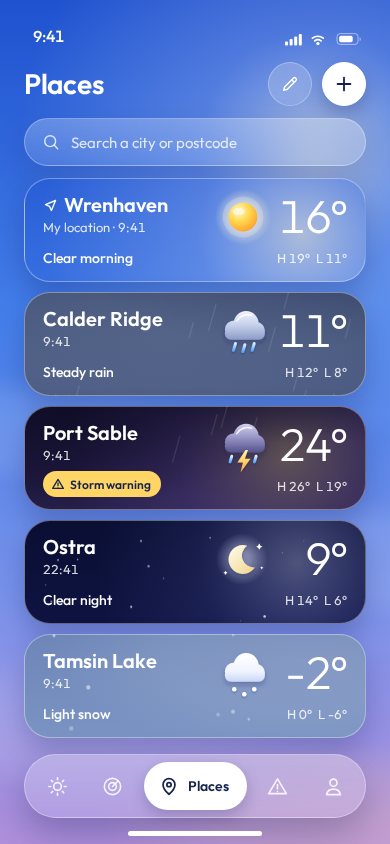
A list screen from Drizzle, a weather with living skies app template in a Glass style. Screen 14 of 25.
Drizzle is a complete weather app: welcome, location access, sign in and a code, a home with now, the next hours and four metric tiles, an hourly chart, a 10 day outlook, a day in detail, rain in the next hours, a live radar map with a timeline, air quality, sun and moon, saved places that each wear their own sky, adding a place, a city at night, severe alerts, home screen widgets, a Plus plan, notifications, profile and settings. The sky behind every screen changes with the conditions it reports.
| Detail | Value |
|---|---|
| Screen type | List |
| App | Drizzle: Weather with living skies |
| Category | Lifestyle |
| Design language | Glass, dark |
| Type | Outfit |
| Colours | #2f63d8 background, #5f8eee surface, #ffffff text, #d5e0fb text-muted, #ffd666 accent, #17234f accent-contrast, #8fd3ff secondary, #9db8f5 border, #ff7a6b danger |
What this screen says
- Places
- Search a city or postcode
- Wrenhaven
- My location · 9:41
- Clear morning
- 16°H 19° L 11°
- Calder Ridge
- Steady rain
- 11°H 12° L 8°
- Port Sable
- Storm warning
- 24°H 26° L 19°
- Ostra
- Clear night
- 9°H 14° L 6°
- Tamsin Lake
- Light snow
- -2°H 0° L -6°
Around it in Drizzle
More list and feed screens
- Roost Shopping list: Your shared house, stuck to the fridge door
- Trellis Beds: Vegetable garden planner
- Grain Album: Camera and photo editor
- Posy Shop: Flower delivery and weekly stems
- Fern Reminders: Plant care
- Doorstep Results: Homes for sale and rent
- Rewear Offers: Secondhand fashion marketplace
- Laced Calendar: Sneaker drops and raffles
- Gloss Salons: Salon and spa booking
- Vow Notifications: Wedding planner
- Byline Sections: Daily news reader
- Shelf Notifications: Reading tracker and book club
Every lifestyle app list screen
What makes a good list screen
- Show what people need to decide. Each row should carry just enough to choose: a title, one or two details and a status. Everything else belongs on the detail screen.
- Keep rows consistent. The same information in the same place on every row lets people scan down a column instead of reading each item.
- Group with headings. Dates, categories or status headings break long lists into chunks people can skip through.
- Make common actions quick. Swipe actions, a checkbox or a heart on the row save opening the item for small tasks.
The full list screen guide and every example
Remix Drizzle free: describe your own app and it is drawn in this design. Or get its files from $10: Figma, React Native, SwiftUI, Flutter and HTML.