Templates · Search and explore screens · Lifestyle app · Dorm
Dorm Map screen
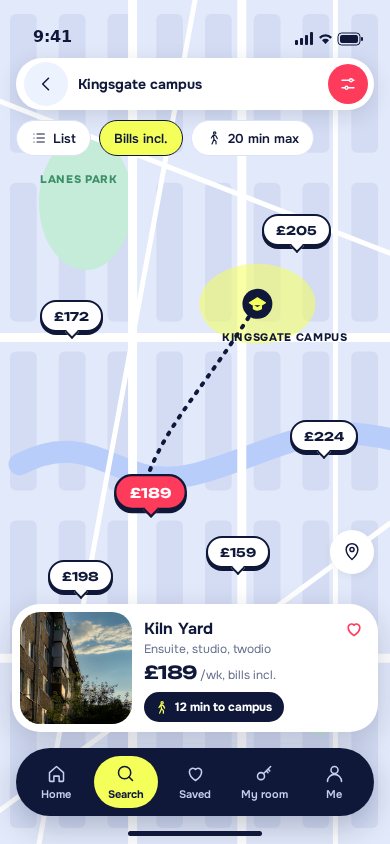
A search screen from Dorm, a find student housing app template in a Gen Z style. Screen 7 of 25.
Dorm is a complete student housing app: welcome, pick your university, sign in, a home that picks up your application, search with filters, a price pin map, a property page with room types, amenities and commute times, a room page with a floor plan, a virtual tour, a commute planner, compare, saved places, a three step application, deposit checkout and a booking confirmed key fob, flatmate matching and a flatmate profile, chat with the property team, payments, a move in checklist, Dorm Plus, notifications, profile and settings. Sky milk and white with cherry, lemon, lilac and ink.
| Detail | Value |
|---|---|
| Screen type | Search |
| App | Dorm: Find student housing |
| Category | Lifestyle |
| Design language | Gen Z, light |
| Type | Unbounded for headings, Onest for text |
| Colours | #edf2ff background, #ffffff surface, #10183a text, #66708f text-muted, #ff3b5c accent, #ffffff accent-contrast, #f4ff5a secondary, #dbe3f6 border, #22c58b success, #c9b8ff tertiary |
What this screen says
- Kingsgate campus
- List Bills incl. 20 min max
- Lanes Park
- Kiln Yard
- Ensuite, studio, twodio
- £189 /wk, bills incl.
- 12 min to campus
- Home
- Search
- Saved
- My room
- Me
Around it in Dorm
More search and explore screens
- Trove Search: Visual ideas and boards
- Vidi Search: Video platform for creators
- Roll Search: Photo library and backups
- Splice Sounds: Video editor for short clips
- Blush Shop: Beauty and makeup shopping
- Flatpack Search: Furniture store with room previews
- Column Discover: Newsletters and independent writers
- Fetch Find care: Dog walkers and pet sitters
- Forecourt Search: Buy and sell used cars
- Tower Roaming: Mobile plan, data and bills
- Haul Categories: Bargain fashion and finds
- Muse Explore: AI image studio
Every lifestyle app search screen
What makes a good search screen
- Show something before people type. Recent searches, popular items or categories make the empty search screen useful and save typing.
- Suggest as people type. Autocomplete with matching items, not only matching words, lets people jump straight to a result.
- Make filters visible and reversible. Show active filters as chips that can be removed in one tap, and the number of results as filters change.
- Forgive typos. Close matches and "Did you mean" stop a spelling mistake from ending in an empty screen.
The full search screen guide and every example
Remix Dorm free: describe your own app and it is drawn in this design. Or get its files from $10: Figma, React Native, SwiftUI, Flutter and HTML.