Templates · Detail screens · Fitness app · Donor
Donor Prepare screen
A detail screen from Donor, a health and fitness app template in a Clinical style. Screen 11 of 25.
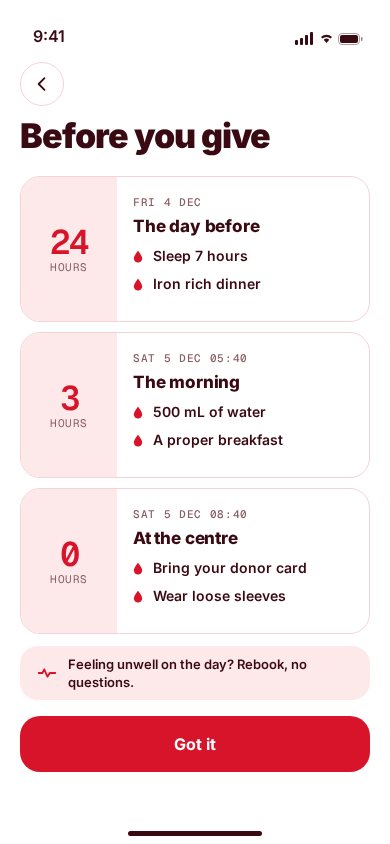
Donor is donor covers giving blood end to end: an eligibility checklist with big yes and no toggles, centres on a drawn map, slot booking and check in, a countdown ring to your next eligible date, recovery by blood component and a journey line from arm to hospital. It also has donation history, impact, stock levels, compatibility, milestones, a donor card, notifications, profile and settings.
| Detail | Value |
|---|---|
| Screen type | Detail |
| App | Donor: Blood donation, counted drop by drop |
| Category | Health and fitness |
| Design language | Clinical, light |
| Type | Inter |
| Colours | #ffffff background, #fde8ea surface, #3a0a12 text, #8a5d63 text-muted, #d7142a accent, #ffffff accent-contrast, #f3d3d7 border, #1f8a5b success |
What this screen says
- Before you give
- 24hours
- Fri 4 Dec
- The day before
- Sleep 7 hours
- Iron rich dinner
- 3hours
- Sat 5 Dec 05:40
- The morning
- 500 mL of water
- A proper breakfast
- 0hours
- Sat 5 Dec 08:40
- At the centre
- Bring your donor card
- Wear loose sleeves
- Feeling unwell on the day? Rebook, no questions.
- Got it
Around it in Donor
More detail screens
- Rise Night: Alarm clock and sleep cycles
- Ward Visit: Patient portal for results, visits and messages
- Level Reading: Glucose monitor companion
- Reformer Class: Pilates studio booking
- Sip Drink: Water intake and hydration
- Mend Session: Physio and rehab exercises
- Tabata Workout: HIIT interval timer
- Jab Workout: Boxing workouts with a smart bag
- Exhale Box breathing: Breathwork sessions
- Bump This week: Pregnancy week by week
- Locker Check in: Gym membership and class booking
- Morsel Result: AI calorie tracker
Every fitness app detail screen
What makes a good detail screen
- Lead with what identifies the item. A large image or title, the price or status, and the key facts at the top. People should know they are in the right place at a glance.
- Keep the main action visible. A sticky bottom button for Add to cart, Book or Play stays reachable while people scroll through details.
- Order information by importance. The facts that decide the choice come first; reviews, specifications and fine print further down.
- Use progressive disclosure. Long descriptions, specifications and policies can expand on tap rather than filling the screen.
The full detail screen guide and every example
Remix Donor free: describe your own app and it is drawn in this design. Or get its files from $10: Figma, React Native, SwiftUI, Flutter and HTML.