Templates · Detail screens · Fitness app · Dew
Dew Product screen
A detail screen from Dew, an AI skin scan and routine app template in a Clinical style. Screen 16 of 25.
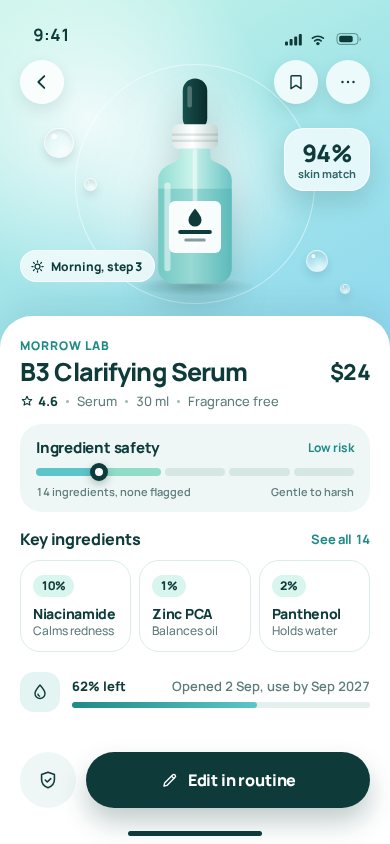
Dew is a complete AI skin care app: onboarding with goals and skin type, a guided face scan, a skin report with a score ring and a numbered face map, concerns in detail, a home with today's score and routine, morning and evening routines with timed steps, a routine builder, a product shelf, product pages with ingredient safety, a product scanner, conflict checks, progress with compare photos, a skin diary, insights, a membership, profile and settings. Pale aqua and white with deep teal, a dewy mint to aqua gradient and soft coral.
| Detail | Value |
|---|---|
| Screen type | Detail |
| App | Dew: AI skin scan and routine |
| Category | Health and fitness |
| Design language | Clinical, light |
| Type | Manrope |
| Colours | #eef7f6 background, #ffffff surface, #0e3b3a text, #6b8a88 text-muted, #0e3b3a accent, #ffffff accent-contrast, #9fe4e6 secondary, #dcecea border, #ff8f7a danger |
What this screen says
- skin match
- Morning, step 3
- Morrow Lab
- B3 Clarifying Serum
- 4.6Serum30 mlFragrance free
- Ingredient safety
- Low risk
- 14 ingredients, none flagged Gentle to harsh
- Key ingredientsSee all 14
- Niacinamide
- Calms redness
- Zinc PCA
- Balances oil
- Panthenol
- Holds water
- 62% leftOpened 2 Sep, use by Sep 2027
- Edit in routine
Around it in Dew
More detail screens
- Exhale Box breathing: Breathwork sessions
- Bump This week: Pregnancy week by week
- Locker Check in: Gym membership and class booking
- Morsel Result: AI calorie tracker
- Cradle Sleep: Baby tracker
- Medly Suggested care: Doctor on call
- Donor Centre: Blood donation, counted drop by drop
- Unfold Class: Yoga and stretching
- Kilo Lift: Strength training log
- Cyra Day detail: Cycle tracker
- Harbor Entry: Therapy and mood
- Fasten Stages: Intermittent fasting
Every fitness app detail screen
What makes a good detail screen
- Lead with what identifies the item. A large image or title, the price or status, and the key facts at the top. People should know they are in the right place at a glance.
- Keep the main action visible. A sticky bottom button for Add to cart, Book or Play stays reachable while people scroll through details.
- Order information by importance. The facts that decide the choice come first; reviews, specifications and fine print further down.
- Use progressive disclosure. Long descriptions, specifications and policies can expand on tap rather than filling the screen.
The full detail screen guide and every example
Remix Dew free: describe your own app and it is drawn in this design. Or get its files from $10: Figma, React Native, SwiftUI, Flutter and HTML.