Templates · Detail screens · Food app · Dash
Dash Order details screen
A detail screen from Dash, a ten minute grocery delivery app template in a Playful style. Screen 19 of 25.
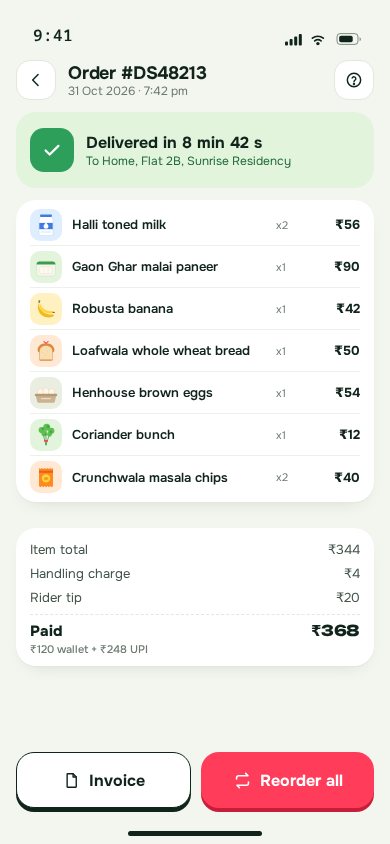
Dash is a complete quick commerce grocery app: welcome, delivery location, phone sign in and OTP, a home with the minutes sticker, deals and quick add rails, all categories, search, an aisle with a subcategory rail, a product page, offers, cart, a new address form, payment, order placed, live rider tracking on a street map, a chat with the rider, delivered with a rating, orders and an order bill, buy again, a monthly spends dashboard, Dash Pass, notifications, account and settings. Sage and white with forest ink, radish red and lime.
| Detail | Value |
|---|---|
| Screen type | Detail |
| App | Dash: Ten minute grocery delivery |
| Category | Food |
| Design language | Playful, light |
| Type | Unbounded for headings, Onest for text |
| Colours | #f3f6ef background, #ffffff surface, #10241b text, #6c7a70 text-muted, #ff3d5a accent, #ffffff accent-contrast, #c9f04d secondary, #e3e8dc border, #2e9e5b success |
What this screen says
- Order #DS48213
- 31 Oct 2026 · 7:42 pm
- Delivered in 8 min 42 sTo Home, Flat 2B, Sunrise Residency
- Halli toned milk
- Gaon Ghar malai paneer
- Robusta banana
- Loafwala whole wheat bread
- Henhouse brown eggs
- Coriander bunch
- Crunchwala masala chips
- Item total ₹344
- Handling charge ₹4
- Rider tip ₹20
- Paid₹120 wallet + ₹248 UPI
- Invoice
- Reorder all
Around it in Dash
More detail screens
- Ember Probe: Smoker and grill thermometer
- Steep Tea: Tea brewing and tasting notes
- Brigade Ticket: Restaurant kitchen and line ops
- Nibs Result: Food allergy and label scanner
- Ladle Recipe: Recipes and meal planning
- Pantry Product: Grocery delivery
- Brewly Drink: Coffee ordering and loyalty
- Tabla Restaurant: Tables worth dressing for
- Corked Label match: Wine journal and cellar
- Crumb Bake: Neighbourhood bakery
- Tiffin Restaurant: Food delivery
- Courier Offer: Food delivery driver app
What makes a good detail screen
- Lead with what identifies the item. A large image or title, the price or status, and the key facts at the top. People should know they are in the right place at a glance.
- Keep the main action visible. A sticky bottom button for Add to cart, Book or Play stays reachable while people scroll through details.
- Order information by importance. The facts that decide the choice come first; reviews, specifications and fine print further down.
- Use progressive disclosure. Long descriptions, specifications and policies can expand on tap rather than filling the screen.
The full detail screen guide and every example
Remix Dash free: describe your own app and it is drawn in this design. Or get its files from $10: Figma, React Native, SwiftUI, Flutter and HTML.