Templates · Sign in and sign up screens · Food app · Curbside
Curbside Sign in screen
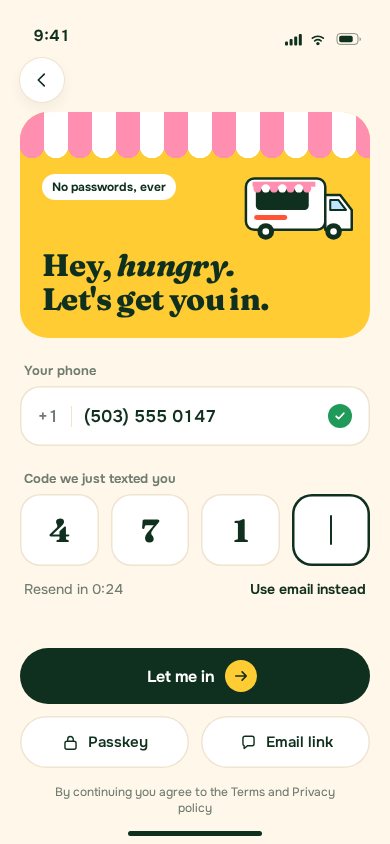
A sign in screen from Curbside, a food app template in a Gen Z style. Screen 3 of 25.
Curbside is a complete food truck app: welcome, cravings, sign in, a home with trucks parked near you, a live map, search, truck pages with menus and dishes, a cart, pickup checkout and an order ticket, live order status, following a truck on the move, reviews, a saved list, the weekly parking schedule, a night market, video drops, taste stats, order history, a Curbside Pass plan, notifications, profile and settings. Warm paper, pickle green and mustard, with pink striped awnings.
| Detail | Value |
|---|---|
| Screen type | Sign in |
| App | Curbside: Street food and food truck finder |
| Category | Food |
| Design language | Gen Z, light |
| Type | Fraunces for headings, Onest for text |
| Colours | #fff7ea background, #ffffff surface, #10301f text, #6f7d70 text-muted, #ffcc33 accent, #10301f accent-contrast, #ff8fb1 secondary, #efe4cf border, #ff5436 danger |
What this screen says
- Hey, hungry.
- Let's get you in.
- No passwords, ever
- Your phone
- +1 (503) 555 0147
- Code we just texted you
- Resend in 0:24 Use email instead
- Let me in
- Passkey
- Email link
- By continuing you agree to the Terms and Privacy policy
Around it in Curbside
More sign in and sign up screens
- Nosh Sign in: Local restaurant reviews
- Buns Sign in: Burger chain ordering and deals
- Slice Sign in: Pizza ordering with a live tracker
- Crate Sign up: Meal kits delivered weekly
- Dash Sign in: Ten minute grocery delivery
- Aisle Sign in: Shared grocery lists
- Menu Sign in: Scan, order and pay at the table
- Mart Sign in: Supermarket app with loyalty and scan and go
- Rescue Sign in: Surprise bags of surplus food
- Omakase Sign in: Chef's counter reservations
- Lunchbox Sign in: School lunch planner for parents
- Agave Sign up: Cocktails and home bar
What makes a good login screen
- Offer the fastest option first. Sign in with Apple, Google or a passkey takes one tap. If you support them, put them above the email form. Apple asks apps that use a third-party login like Google to also offer an equivalent privacy-focused option, such as Sign in with Apple.
- Separate sign in from sign up clearly. Use different headings and buttons, and a clear link to switch. People who already have an account should never end up creating a second one by accident.
- Use the right keyboard and autofill. Email fields should open the email keyboard and support password managers and one-time code autofill. Small details, big difference in how many people get through.
- Write errors that help. "That password doesn't match this email" is better than "Error 401". Keep what people typed so they only fix the part that was wrong.
The full login screen guide and every example
Remix Curbside free: describe your own app and it is drawn in this design. Or get its files from $10: Figma, React Native, SwiftUI, Flutter and HTML.