Templates · Detail screens · Food app · Crumb
Crumb Order screen
A detail screen from Crumb, a neighbourhood bakery app template in a Neubrutalism style. Screen 17 of 25.
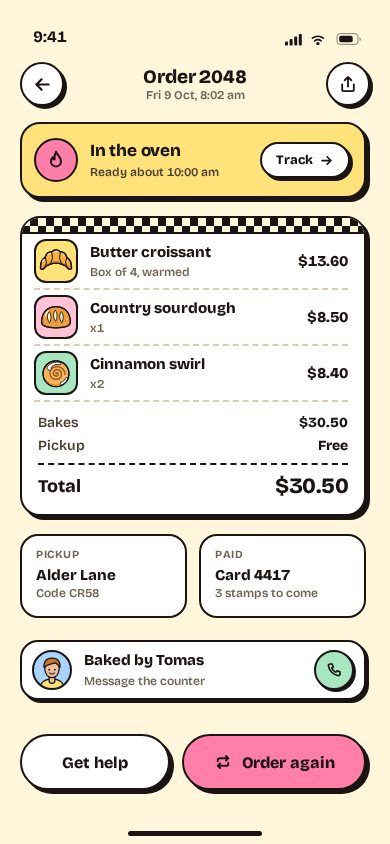
Crumb is a complete bakery app: welcome, sign in, a home with today's bakes fresh from the oven, the menu, search, a bake with sizes and extras, a custom cake builder with tiers, sponge, icing and toppings, preorders, basket, pickup slots, payment, live order tracking from oven to counter, past orders, a stamp card with rewards, a weekly bread club, bakeries nearby, your year in bakes, profile and settings. Butter yellow, strawberry pink and cream with thick black outlines.
| Detail | Value |
|---|---|
| Screen type | Detail |
| App | Crumb: Neighbourhood bakery |
| Category | Food |
| Design language | Neubrutalism, light |
| Type | Bricolage Grotesque |
| Colours | #fff6dc background, #ffffff surface, #1a1512 text, #6f6455 text-muted, #ff7fa8 accent, #1a1512 accent-contrast, #ffe27a secondary, #1a1512 border, #ff5a3c danger |
What this screen says
- Order 2048Fri 9 Oct, 8:02 am
- In the ovenReady about 10:00 am
- Track
- Butter croissantBox of 4, warmed
- Country sourdoughx1
- Cinnamon swirlx2
- Bakes$30.50
- PickupFree
- Total$30.50
- PickupAlder Lane
- Code CR58
- PaidCard 4417
- 3 stamps to come
- Baked by TomasMessage the counter
- Get help
- Order again
Around it in Crumb
More detail screens
- Tabla Restaurant: Tables worth dressing for
- Corked Label match: Wine journal and cellar
- Tiffin Restaurant: Food delivery
- Courier Offer: Food delivery driver app
- Picker Batch offer: Grocery shopper app
- Queue Spot: Join the waitlist from anywhere
- Nosh Restaurant: Local restaurant reviews
- Buns Item: Burger chain ordering and deals
- Slice Pizza: Pizza ordering with a live tracker
- Crate Recipe: Meal kits delivered weekly
- Dash Product: Ten minute grocery delivery
- Aisle Item: Shared grocery lists
What makes a good detail screen
- Lead with what identifies the item. A large image or title, the price or status, and the key facts at the top. People should know they are in the right place at a glance.
- Keep the main action visible. A sticky bottom button for Add to cart, Book or Play stays reachable while people scroll through details.
- Order information by importance. The facts that decide the choice come first; reviews, specifications and fine print further down.
- Use progressive disclosure. Long descriptions, specifications and policies can expand on tap rather than filling the screen.
The full detail screen guide and every example
Remix Crumb free: describe your own app and it is drawn in this design. Or get its files from $10: Figma, React Native, SwiftUI, Flutter and HTML.