Templates · Live tracking screens · Education app · Cram
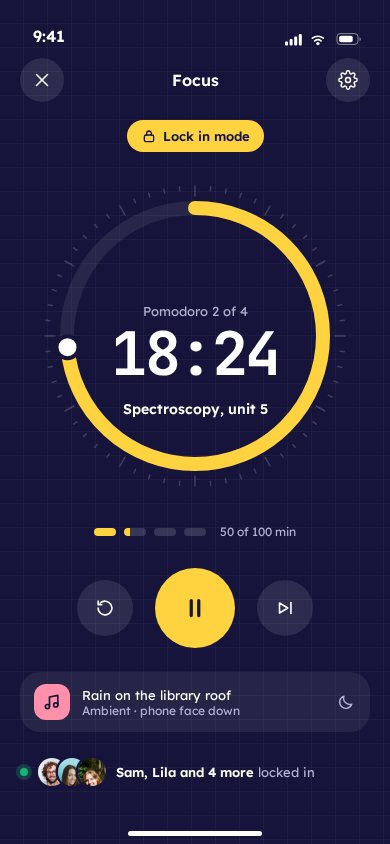
Cram Focus screen
A tracking screen from Cram, an exam prep and mock tests app template in a Gen Z style. Screen 19 of 25.
Cram is a complete exam prep app: welcome, pick your exam, sign up, a home with the exam countdown, a predicted grade and today's plan, subjects with unit mastery, search, index card flashcards, a new card form, mock tests with a brief, a timed question with bubble sheet answers, the answer sheet, results with a red pen grade, a topic breakdown, a worked explanation, stats, a study plan, a focus timer, a study squad leaderboard, Cram Plus with checkout, notifications, profile and settings. Graph paper and ink navy with pencil yellow, eraser pink and red pen.
| Detail | Value |
|---|---|
| Screen type | Tracking |
| App | Cram: Exam prep and mock tests |
| Category | Education |
| Design language | Gen Z, light |
| Type | Lexend |
| Colours | #f3f4fa background, #ffffff surface, #16143a text, #6d6b8c text-muted, #ffd23f accent, #16143a accent-contrast, #3d4bff secondary, #e3e4f0 border, #ff4a3d danger |
What this screen says
- Focus
- Lock in mode
- Pomodoro 2 of 418:24
- Spectroscopy, unit 5
- 50 of 100 min
- Rain on the library roofAmbient · phone face down
- Sam, Lila and 4 more locked in
Around it in Cram
More live tracking screens
- Quad Shuttle: University campus app
- Wren Read aloud: Early reading for kids
- Proof Mock exam: Maths tutor that shows its working
- Skim Schulte table: Speed reading trainer
- Terra Map quiz: Geography and flags quiz
- Gambit Puzzle rush: Chess training
- Parla Streak: Language learning
- Recall Exam countdown: Flashcards and spaced repetition
- Zenith Light pollution: Night sky guide
- Almanac Places: The free encyclopedia reader
- Penpal Room: Language exchange chat
- Quanta Pendulum lab: Interactive physics lessons
Every education app tracking screen
What makes a good live tracking screen
- The live number is the hero. Arrival time, pace, distance or time left, in large type at the top or centre.
- Show status in words. "Driver is 3 minutes away" or "Halfway there" alongside the map or chart.
- Make it readable while moving. Large numbers, high contrast and big buttons for pause, stop or call.
- Keep updates calm. Smooth movement on the map and steady numbers; jumpy updates feel broken.
The full live tracking screen guide and every example
Remix Cram free: describe your own app and it is drawn in this design. Or get its files from $10: Figma, React Native, SwiftUI, Flutter and HTML.