Templates · Detail screens · Finance app · Compound
Compound Fund holdings screen
A detail screen from Compound, a mutual funds and SIPs app template in a Minimal style. Screen 9 of 25.
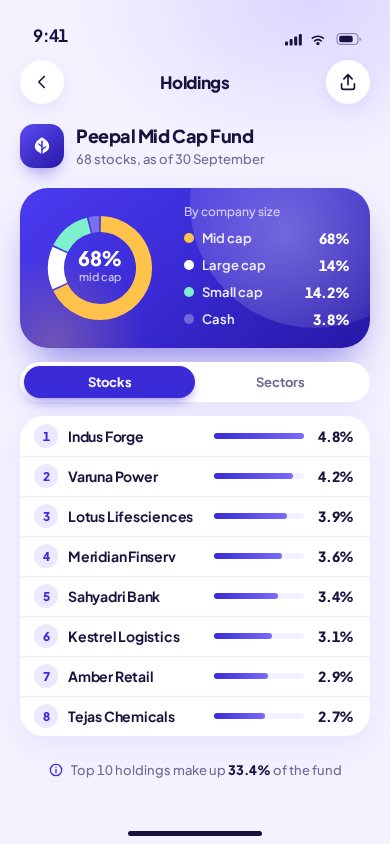
Compound is a complete mutual fund app for Indian investors: welcome, mobile sign in with OTP, KYC, a home with the portfolio value and XIRR, fund discovery, lists and fund pages with returns and a risk meter, holdings, compare, a SIP calculator, starting a SIP with an autopay mandate, one time investments, an order confirmation, investments, SIPs, goals, portfolio analysis, tax, transactions, profile and settings. Lavender white with deep indigo, marigold and mint, amounts in rupees with Indian grouping.
| Detail | Value |
|---|---|
| Screen type | Detail |
| App | Compound: Mutual funds and SIPs |
| Category | Finance |
| Design language | Minimal, light |
| Type | Plus Jakarta Sans |
| Colours | #f4f2ff background, #ffffff surface, #17133f text, #6e6a93 text-muted, #3a2bd6 accent, #ffffff accent-contrast, #ffc24a secondary, #e7e3fb border, #e5484d danger |
What this screen says
- Holdings
- Peepal Mid Cap Fund
- 68 stocks, as of 30 September
- mid cap
- By company size
- Mid cap68%
- Large cap14%
- Small cap14.2%
- Cash3.8%
- Stocks Sectors
- Indus Forge
- Varuna Power
- Lotus Lifesciences
- Meridian Finserv
- Sahyadri Bank
- Kestrel Logistics
- Amber Retail
- Tejas Chemicals
- Top 10 holdings make up 33.4% of the fund
Around it in Compound
More detail screens
- Marigold Card details: Mobile banking
- Zentra Coin: Crypto trading
- Payday Pay run: Payroll for small teams
- Roundup Purchase: Invest your spare change
- Envelope Category: Give every dollar a job
- Recur Subscription: Track and cancel subscriptions
- Keel Card: Corporate cards and spend controls
- Giftly Shop: Gift cards, sent and stored
- Zap Wallet: Pay friends with a note
- Billfold Card: Cards, passes and tickets wallet
- Payly Chat: UPI payments, recharges and bills
- Crest Card: Credit card bills and rewards
Every finance app detail screen
What makes a good detail screen
- Lead with what identifies the item. A large image or title, the price or status, and the key facts at the top. People should know they are in the right place at a glance.
- Keep the main action visible. A sticky bottom button for Add to cart, Book or Play stays reachable while people scroll through details.
- Order information by importance. The facts that decide the choice come first; reviews, specifications and fine print further down.
- Use progressive disclosure. Long descriptions, specifications and policies can expand on tap rather than filling the screen.
The full detail screen guide and every example
Remix Compound free: describe your own app and it is drawn in this design. Or get its files from $10: Figma, React Native, SwiftUI, Flutter and HTML.