Templates · List and feed screens · Social app · Carrier
Carrier Activity screen
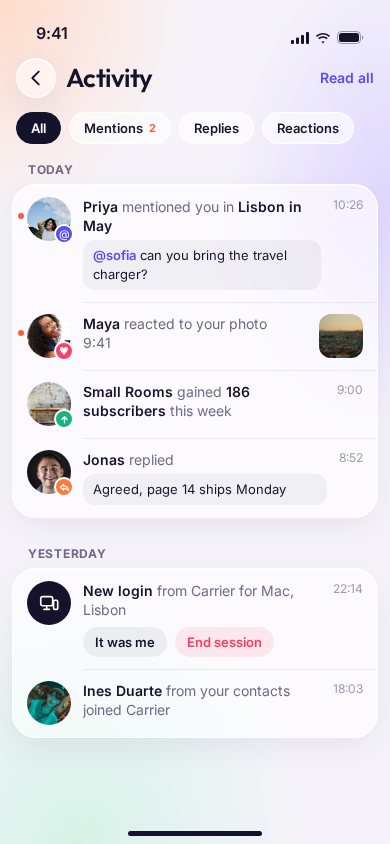
A list screen from Carrier, a cloud messaging with channels app template in a Glass style. Screen 23 of 25.
Carrier is a complete cloud messenger: welcome, phone number and code, a chat list with folders and pinned chats, a conversation with photos, a voice note and a reply, a group with a poll, a contact profile, a photo viewer, channels you follow, a channel feed with views and reactions, channel info, discover and search, creating a channel, writing and scheduling a post, channel stats, calls with voice and video, cloud storage, the Plus plan with checkout, activity, your profile and settings. Pearl glass with persimmon, rose and ink.
| Detail | Value |
|---|---|
| Screen type | List |
| App | Carrier: Cloud messaging with channels |
| Category | Social |
| Design language | Glass, light |
| Type | Outfit for headings, Inter for text |
| Colours | #f6f4fa background, #ffffff surface, #15132b text, #6e6a86 text-muted, #ff5a3c accent, #ffffff accent-contrast, #5b4cf0 secondary, #e7e4f0 border, #ff3b5c danger |
What this screen says
- Activity
- Read all
- All Mentions 2 Replies Reactions
- Today
- Priya mentioned you in Lisbon in May@sofia can you bring the travel charger?
- Maya reacted to your photo
- Small Rooms gained 186 subscribers this week
- Jonas replied Agreed, page 14 ships Monday
- Yesterday
- New login from Carrier for Mac, Lisbon
- It was me End session
- Ines Duarte from your contacts joined Carrier
Around it in Carrier
More list and feed screens
- Huddle Notifications: Interest groups and meetups
- Glade Comments: Photo and clip social network
- Onair Notifications: Live streaming
- Drift Comments: Reels and voice rooms
- Glitz Live now: Party live streaming
- Hearth Shared album: Messenger for trips and circles
- Chirp Chat actions: Messenger with file sharing
- Banter New chat: Live messenger
- Natter Start new: Minimal messenger
- Nearly Crossed paths: Dating by crossed paths
- Linkup Skills: Professional network and jobs
- Quorum Comments: Questions and expert answers
What makes a good list screen
- Show what people need to decide. Each row should carry just enough to choose: a title, one or two details and a status. Everything else belongs on the detail screen.
- Keep rows consistent. The same information in the same place on every row lets people scan down a column instead of reading each item.
- Group with headings. Dates, categories or status headings break long lists into chunks people can skip through.
- Make common actions quick. Swipe actions, a checkbox or a heart on the row save opening the item for small tasks.
The full list screen guide and every example
Remix Carrier free: describe your own app and it is drawn in this design. Or get its files from $10: Figma, React Native, SwiftUI, Flutter and HTML.