Templates · List and feed screens · Travel app · Caravan
Caravan Notifications screen
A list screen from Caravan, a campervan rental and road trips app template in a Playful style. Screen 22 of 25.
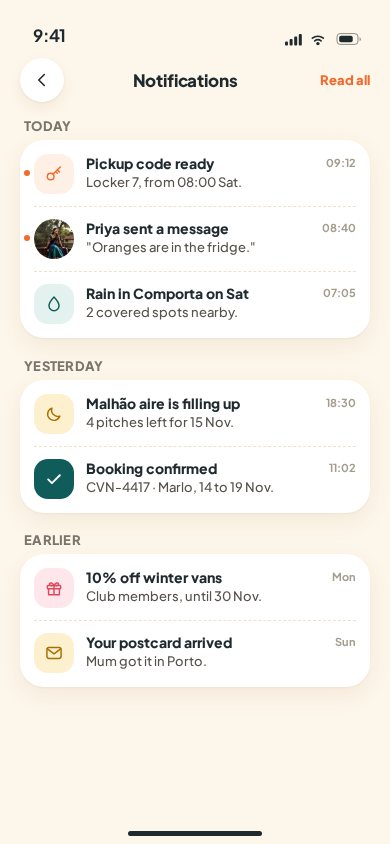
Caravan is a complete campervan rental and road trip app: welcome and sign in, an explore home, van search with results, a van page with a drawn floor plan, dates, extras, checkout and a booked screen, trips and a trip hub, pickup check-in, a route planner, live driving on a drawn coastal map, overnight spots and a spot page, a video van guide, a road journal, a postcard maker, notifications, a Club plan, profile and settings. Sun cream and teal with 70s livery stripes in mustard, tangerine and cherry.
| Detail | Value |
|---|---|
| Screen type | List |
| App | Caravan: Campervan rental and road trips |
| Category | Travel |
| Design language | Playful, light |
| Type | Fraunces for headings, Plus Jakarta Sans for text |
| Colours | #fdf6ea background, #ffffff surface, #1f2a2e text, #7b766b text-muted, #f26a2e accent, #ffffff accent-contrast, #0f5c5a secondary, #efe2cb border, #e0485c danger |
What this screen says
- Notifications
- Read all
- TODAY
- Pickup code ready
- Locker 7, from 08:00 Sat.
- Priya sent a message
- "Oranges are in the fridge."
- Rain in Comporta on Sat
- 2 covered spots nearby.
- YESTERDAY
- Malhão aire is filling up
- 4 pitches left for 15 Nov.
- Booking confirmed
- CVN-4417 · Marlo, 14 to 19 Nov.
- EARLIER
- 10% off winter vans
- Club members, until 30 Nov.
- Mon
- Your postcard arrived
- Mum got it in Porto.
- Sun
Around it in Caravan
More list and feed screens
- Kerb History: Parking that reads like a road sign
- Linea Routes: City transit
- Hollow Results: Cabin and boutique stays
- Aloft My flights: Flight tracker
- Pitch Trips: Campsite booking and trip kit
- Hail Message driver: Ride hailing
- Volta Notifications: EV charging
- Museo Notifications: Museum guide
- Roamly Reviews: Trips, stays and experiences
- Jaunt Buses: Bus, train and flight booking
- Spoke Journeys: Bike sharing
- Navara Trips: Yacht charter
What makes a good list screen
- Show what people need to decide. Each row should carry just enough to choose: a title, one or two details and a status. Everything else belongs on the detail screen.
- Keep rows consistent. The same information in the same place on every row lets people scan down a column instead of reading each item.
- Group with headings. Dates, categories or status headings break long lists into chunks people can skip through.
- Make common actions quick. Swipe actions, a checkbox or a heart on the row save opening the item for small tasks.
The full list screen guide and every example
Remix Caravan free: describe your own app and it is drawn in this design. Or get its files from $10: Figma, React Native, SwiftUI, Flutter and HTML.