Templates · Search and explore screens · Lifestyle app · Byline
Byline Search screen
A search screen from Byline, a daily news reader app template in a Minimal style. Screen 11 of 25.
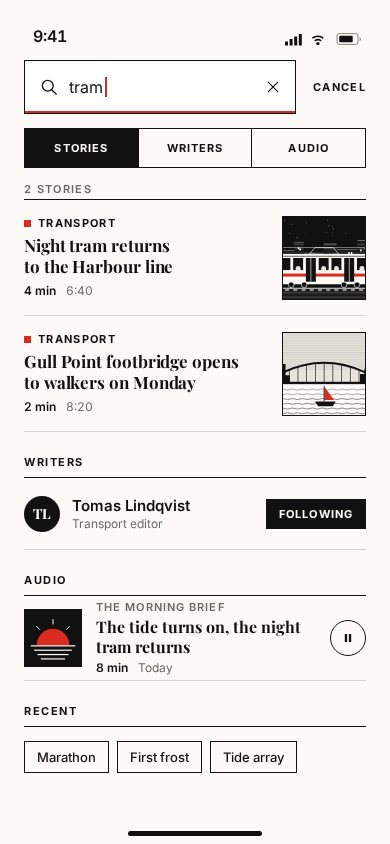
Byline is a complete news app for an invented city paper: welcome, sign in, a code and topic picks, a front page for today, an article with a drop cap and pull quote, live updates on a timeline, sections, a topic page, search, a writer page, audio briefings with a player, puzzles with a mini crossword, saved stories, alerts, reading stats, a subscription with payment, profile and settings. Everything is square cornered and ruled like a printed page, with red kept for what is live, new or selected.
| Detail | Value |
|---|---|
| Screen type | Search |
| App | Byline: Daily news reader |
| Category | Lifestyle |
| Design language | Minimal, light |
| Type | Playfair Display |
| Colours | #fbfaf7 background, #f0eee8 surface, #111111 text, #6e6a63 text-muted, #d92b1f accent, #ffffff accent-contrast, #111111 secondary, #d8d4ca border, #d92b1f danger |
What this screen says
- tram
- Cancel
- Stories Writers Audio
- 2 stories
- Transport
- Night tram returns to the Harbour line
- 4 min6:40
- Gull Point footbridge opens to walkers on Monday
- 2 min8:20
- Writers
- TL
- Tomas LindqvistTransport editor
- Following
- Audio
- The morning brief
- The tide turns on, the night tram returns
- 8 minToday
- Recent
- Marathon First frost Tide array
Around it in Byline
More search and explore screens
- Tidy Services: Book home cleaners
- Dorm Search: Find student housing
- Hem Garments: Tailoring and alterations, collected
- Lendly Search: Borrow things from neighbours
- Stub Search: Fan to fan ticket resale
- Trove Search: Visual ideas and boards
- Vidi Search: Video platform for creators
- Roll Search: Photo library and backups
- Splice Sounds: Video editor for short clips
- Blush Shop: Beauty and makeup shopping
- Flatpack Search: Furniture store with room previews
- Column Discover: Newsletters and independent writers
Every lifestyle app search screen
What makes a good search screen
- Show something before people type. Recent searches, popular items or categories make the empty search screen useful and save typing.
- Suggest as people type. Autocomplete with matching items, not only matching words, lets people jump straight to a result.
- Make filters visible and reversible. Show active filters as chips that can be removed in one tap, and the number of results as filters change.
- Forgive typos. Close matches and "Did you mean" stop a spelling mistake from ending in an empty screen.
The full search screen guide and every example
Remix Byline free: describe your own app and it is drawn in this design. Or get its files from $10: Figma, React Native, SwiftUI, Flutter and HTML.