Templates · Live tracking screens · Fitness app · Bump
Bump Contractions screen
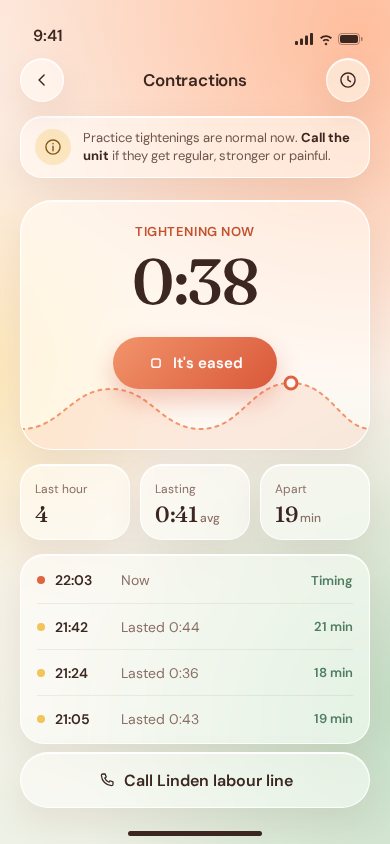
A tracking screen from Bump, a pregnancy week by week app template in a Glass style. Screen 9 of 25.
Bump is a complete pregnancy companion: welcome, a due date calculator, account, a today screen with the week dial, this week's baby and body changes, all 40 weeks, an ultrasound scan viewer, a kick counter and a contraction timer, a daily symptom log, a bump photo diary with a ghost outline camera, weight and symptom trends, appointments with prep, antenatal classes with booking, checkout and confirmation, a shared baby name shortlist, a hospital bag checklist, notifications, a Plus plan, profile and settings. Apricot, cream and sage glass with terracotta and soft serif numbers.
| Detail | Value |
|---|---|
| Screen type | Tracking |
| App | Bump: Pregnancy week by week |
| Category | Health and fitness |
| Design language | Glass, light |
| Type | Fraunces for headings, DM Sans for text |
| Colours | #fbf2ea background, #ffffff surface, #3b2620 text, #8a6f66 text-muted, #e0643f accent, #ffffff accent-contrast, #6f9c80 secondary, #f2c45a highlight, #ecdcd2 border, #d0443a danger |
What this screen says
- Contractions
- Practice tightenings are normal now. Call the unit if they get regular, stronger or painful.
- TIGHTENING NOW
- It's eased
- Last hour 4
- Lasting 0:41avg
- Apart 19min
- 22:03Now Timing
- 21:42Lasted 0:44 21 min
- 21:24Lasted 0:36 18 min
- 21:05Lasted 0:43 19 min
- Call Linden labour line
Around it in Bump
More live tracking screens
- Rise Tracking: Alarm clock and sleep cycles
- Level Low alert: Glucose monitor companion
- Reformer In class: Pilates studio booking
- Sip Workout: Water intake and hydration
- Mend Rest: Physio and rehab exercises
- Tabata Get ready: HIIT interval timer
- Jab Live round: Boxing workouts with a smart bag
- Exhale Breathe: Breathwork sessions
- Locker Live class: Gym membership and class booking
- Dew Step: AI skin scan and routine
- Cradle Feeding timer: Baby tracker
- Donor Recovery: Blood donation, counted drop by drop
Every fitness app tracking screen
What makes a good live tracking screen
- The live number is the hero. Arrival time, pace, distance or time left, in large type at the top or centre.
- Show status in words. "Driver is 3 minutes away" or "Halfway there" alongside the map or chart.
- Make it readable while moving. Large numbers, high contrast and big buttons for pause, stop or call.
- Keep updates calm. Smooth movement on the map and steady numbers; jumpy updates feel broken.
The full live tracking screen guide and every example
Remix Bump free: describe your own app and it is drawn in this design. Or get its files from $10: Figma, React Native, SwiftUI, Flutter and HTML.