Templates · Detail screens · Finance app · Bullion
Bullion Vault screen
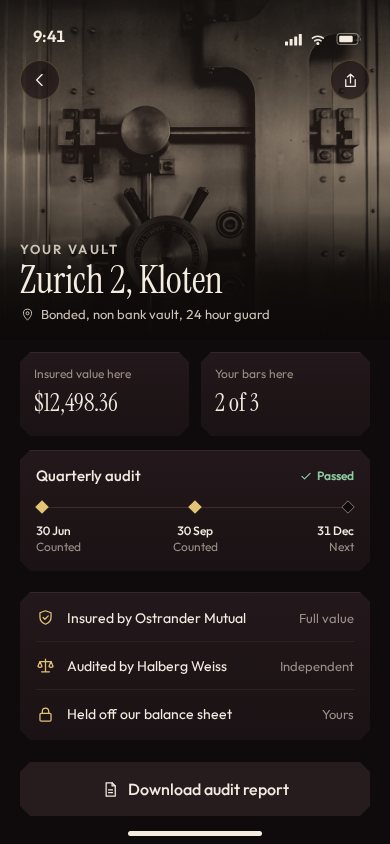
A detail screen from Bullion, a gold and silver savings app template in a Luxury style. Screen 13 of 25.
Bullion is a complete precious metals savings app: welcome and how it works, sign in and a code, a home with your gold and silver in grams, markets and a gold price page, buying by the gram with review and a purchase receipt, your allocated bars with their serials, refiner and vault audit, autosave, savings goals, activity, redeeming coins and bars for insured delivery with live tracking, gifting gold, notifications, a Reserve plan, profile and settings. Velvet black and wine with polished gold, brushed silver and ivory.
| Detail | Value |
|---|---|
| Screen type | Detail |
| App | Bullion: Gold and silver savings |
| Category | Finance |
| Design language | Luxury, dark |
| Type | Instrument Serif for headings, Outfit for text |
| Colours | #0f0a0b background, #1c1315 surface, #f4ece0 text, #9c8f86 text-muted, #d9b45a accent, #1a1008 accent-contrast, #c3c8d1 secondary, #2e2124 border, #e0776e danger |
What this screen says
- Your vault
- Zurich 2, Kloten
- Bonded, non bank vault, 24 hour guard
- Insured value here
- Your bars here
- 2 of 3
- Quarterly audit Passed
- 30 JunCounted
- 30 SepCounted
- 31 DecNext
- Insured by Ostrander Mutual Full value
- Audited by Halberg Weiss Independent
- Held off our balance sheet Yours
- Download audit report
Around it in Bullion
More detail screens
- Roundup Purchase: Invest your spare change
- Envelope Category: Give every dollar a job
- Recur Subscription: Track and cancel subscriptions
- Keel Card: Corporate cards and spend controls
- Giftly Shop: Gift cards, sent and stored
- Zap Wallet: Pay friends with a note
- Billfold Card: Cards, passes and tickets wallet
- Payly Chat: UPI payments, recharges and bills
- Crest Card: Credit card bills and rewards
- Storefront Order: Run your online store
- Bastion Checking: Everyday banking from a big bank
- Later Store: Buy now, pay in four
Every finance app detail screen
What makes a good detail screen
- Lead with what identifies the item. A large image or title, the price or status, and the key facts at the top. People should know they are in the right place at a glance.
- Keep the main action visible. A sticky bottom button for Add to cart, Book or Play stays reachable while people scroll through details.
- Order information by importance. The facts that decide the choice come first; reviews, specifications and fine print further down.
- Use progressive disclosure. Long descriptions, specifications and policies can expand on tap rather than filling the screen.
The full detail screen guide and every example
Remix Bullion free: describe your own app and it is drawn in this design. Or get its files from $10: Figma, React Native, SwiftUI, Flutter and HTML.