Templates · Sign in and sign up screens · Lifestyle app · Brief
Brief Verify screen
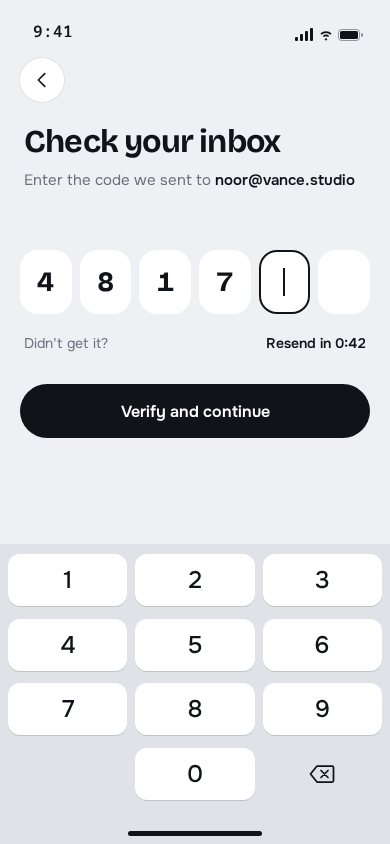
A sign in screen from Brief, a news in sixty words app template in a Minimal style. Screen 4 of 25.
Brief is a complete short news app: welcome, topic picks, sign in and a code, a feed of full screen sixty word story cards stacked like a deck, the full story reader, a morning brief, discover with sections and trending topics, search, a section page, a trending topic timeline, a poll and its results, a weather card, a short video, an audio brief player, a weekly quiz with a score, a share card, saved stories, notifications, reading stats, a Plus plan, profile and settings. Cool grey and white with ink black, one lime highlight and a colour dot per section.
| Detail | Value |
|---|---|
| Screen type | Sign in |
| App | Brief: News in sixty words |
| Category | Lifestyle |
| Design language | Minimal, light |
| Type | Bricolage Grotesque for headings, Onest for text |
| Colours | #eef0f3 background, #ffffff surface, #101318 text, #6a7180 text-muted, #101318 accent, #ffffff accent-contrast, #d4ff4f secondary, #e3e6eb border, #ef4444 danger |
What this screen says
- Check your inbox
- Enter the code we sent to noor@vance.studio
- Didn't get it? Resend in 0:42
- Verify and continue
Around it in Brief
More sign in and sign up screens
- Gavel Sign in: Live online auctions
- Tidy Sign in: Book home cleaners
- Dorm Sign in: Find student housing
- Hem Sign in: Tailoring and alterations, collected
- Lendly Sign in: Borrow things from neighbours
- Stub Sign in: Fan to fan ticket resale
- Trove Sign in: Visual ideas and boards
- Vidi Sign in: Video platform for creators
- Roll Sign in: Photo library and backups
- Splice Sign in: Video editor for short clips
- Blush Sign in: Beauty and makeup shopping
- Flatpack Sign in: Furniture store with room previews
Every lifestyle app sign in screen
What makes a good login screen
- Offer the fastest option first. Sign in with Apple, Google or a passkey takes one tap. If you support them, put them above the email form. Apple asks apps that use a third-party login like Google to also offer an equivalent privacy-focused option, such as Sign in with Apple.
- Separate sign in from sign up clearly. Use different headings and buttons, and a clear link to switch. People who already have an account should never end up creating a second one by accident.
- Use the right keyboard and autofill. Email fields should open the email keyboard and support password managers and one-time code autofill. Small details, big difference in how many people get through.
- Write errors that help. "That password doesn't match this email" is better than "Error 401". Keep what people typed so they only fix the part that was wrong.
The full login screen guide and every example
Remix Brief free: describe your own app and it is drawn in this design. Or get its files from $10: Figma, React Native, SwiftUI, Flutter and HTML.