Templates · Detail screens · Productivity app · Branch
Branch Node screen
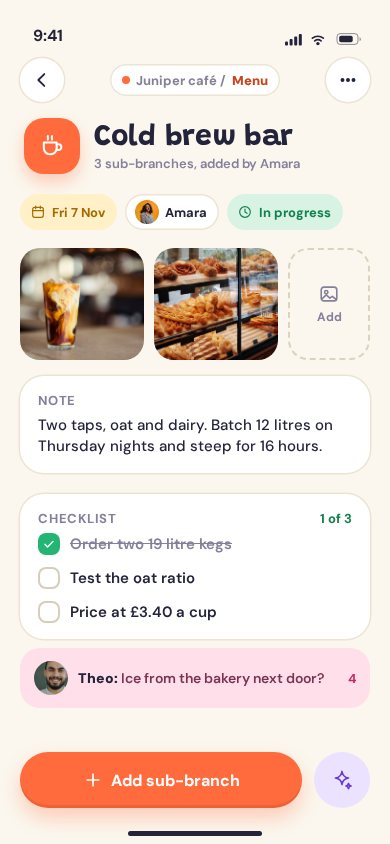
A detail screen from Branch, a mind maps app template in a Playful style. Screen 8 of 25.
Branch is a complete mind mapping app: welcome, a pick your first map step, sign in, a home with the map you are growing and a daily seed prompt, a library of maps, search across ideas and notes, a full canvas editor, an idea with photos, notes and a checklist, adding a branch, map style, an outline view, a timed idea sprint, AI sprouts, templates and a template preview, sharing, a live session with cursors and a huddle, comments, export to a PDF poster and its success screen, insights, a Plus plan, notifications, profile and settings. Warm paper and ink with six bright branch colours.
| Detail | Value |
|---|---|
| Screen type | Detail |
| App | Branch: Mind maps |
| Category | Productivity |
| Design language | Playful, light |
| Type | Grandstander for headings, DM Sans for text |
| Colours | #fbf7ee background, #ffffff surface, #23233a text, #85809a text-muted, #ff6b3d accent, #ffffff accent-contrast, #22b573 secondary, #ece4d3 border, #ff4f8b danger |
What this screen says
- Juniper café / Menu
- Cold brew bar
- 3 sub-branches, added by Amara
- Fri 7 Nov
- Amara In progress
- Add
- Note
- Two taps, oat and dairy. Batch 12 litres on Thursday nights and steep for 16 hours.
- Checklist 1 of 3
- Order two 19 litre kegs
- Test the oat ratio
- Price at £3.40 a cup
- Theo: Ice from the bakery next door?
- Add sub-branch
Around it in Branch
More detail screens
- Beacon Person: Find your devices and people
- Staffroom Approval: HR, payslips and time off
- Slot Meeting: Booking links and meeting scheduling
- Sheet Record: Spreadsheets and databases
- Tunnel Country: VPN and online privacy
- Ping Test details: Internet speed test
- Glance Product: Visual search with the camera
- Replay Video: Record and share screen videos
- Easel Retro template: Collaborative whiteboard
- Token Account: Two-factor codes and sign-in approvals
- Beam Transfer: Send big files
- Parchment Document: Documents, edit and share
Every productivity app detail screen
What makes a good detail screen
- Lead with what identifies the item. A large image or title, the price or status, and the key facts at the top. People should know they are in the right place at a glance.
- Keep the main action visible. A sticky bottom button for Add to cart, Book or Play stays reachable while people scroll through details.
- Order information by importance. The facts that decide the choice come first; reviews, specifications and fine print further down.
- Use progressive disclosure. Long descriptions, specifications and policies can expand on tap rather than filling the screen.
The full detail screen guide and every example
Remix Branch free: describe your own app and it is drawn in this design. Or get its files from $10: Figma, React Native, SwiftUI, Flutter and HTML.