Templates · List and feed screens · Travel app · Backroad
Backroad Packing list screen
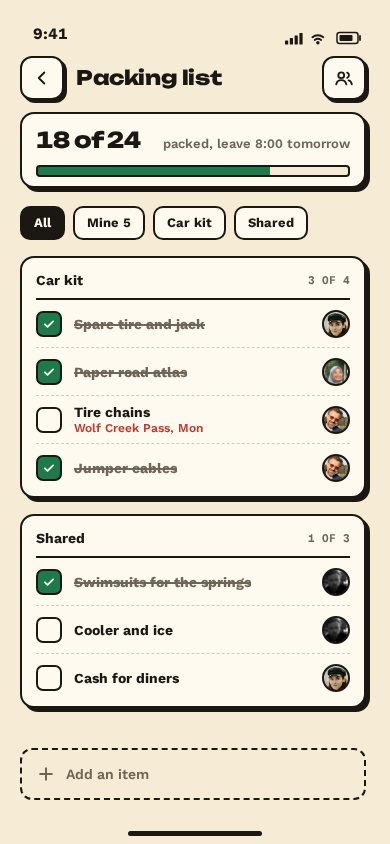
A list screen from Backroad, a road trip planner with stops app template in a Neubrutalism style. Screen 21 of 25.
Backroad is a complete road trip planner: welcome, travel style, sign in, a home with tomorrow's drive, trips, a trip map, a day by day itinerary on a road ribbon, stops along the route, search, a stop, adding a stop and a new trip, the shared budget, road stats, booking a motel with review and a confirmation key tag, live drive mode, a postcard maker, the crew, a packing list, notifications, Backroad Plus, profile and settings. Sand and cream with ink outlines, cone orange, highway green and a dashed yellow centre line.
| Detail | Value |
|---|---|
| Screen type | List |
| App | Backroad: Road trip planner with stops |
| Category | Travel |
| Design language | Neubrutalism, light |
| Type | Unbounded for headings, Work Sans for text |
| Colours | #f6ecd6 background, #fffaf0 surface, #1b1814 text, #6f6556 text-muted, #ff6a1f accent, #1b1814 accent-contrast, #1e7a4a secondary, #1b1814 border, #e0392b danger |
What this screen says
- Packing list
- 18 of 24packed, leave 8:00 tomorrow
- All Mine 5 Car kit Shared
- Car kit 3 OF 4
- Spare tire and jack
- Paper road atlas
- Tire chainsWolf Creek Pass, Mon
- Jumper cables
- Shared 1 OF 3
- Swimsuits for the springs
- Cooler and ice
- Cash for diners
- Add an item
Around it in Backroad
More list and feed screens
- Museo Notifications: Museum guide
- Roamly Reviews: Trips, stays and experiences
- Jaunt Buses: Bus, train and flight booking
- Spoke Journeys: Bike sharing
- Navara Trips: Yacht charter
- Voya Results: Travel booking
- Wheelhouse Trips: Driver app for ride hailing
- Fuelup Fuel prices: Pay at the pump and car wash
- Omnia Mart: Super app for rides, food and payments
- Staya Reviews: Homes and stays from local hosts
- Lodge Reviews: Hotels, deals and reservations
- Fare Results: Flight search and price alerts
What makes a good list screen
- Show what people need to decide. Each row should carry just enough to choose: a title, one or two details and a status. Everything else belongs on the detail screen.
- Keep rows consistent. The same information in the same place on every row lets people scan down a column instead of reading each item.
- Group with headings. Dates, categories or status headings break long lists into chunks people can skip through.
- Make common actions quick. Swipe actions, a checkbox or a heart on the row save opening the item for small tasks.
The full list screen guide and every example
Remix Backroad free: describe your own app and it is drawn in this design. Or get its files from $10: Figma, React Native, SwiftUI, Flutter and HTML.