Templates · Live tracking screens · Travel app · Aloft
Aloft Bag tracker screen
A tracking screen from Aloft, a flight tracker app template in a Dark-first style. Screen 17 of 25.
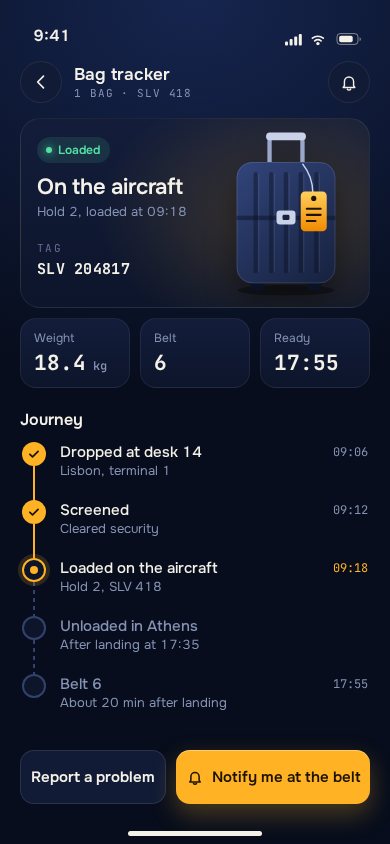
Aloft is a complete flight companion: welcome, sign in and a code, adding a flight, a home built around the next departure, my flights, flight details, a live flight on a dotted map with a route arc, gate change alerts, the departures board, the airport with wait times and a terminal map, a bag tracker, check in, seat choice and the boarding pass, lounges and a lounge pass, a delay forecast, a yearly flight log, a Plus plan, alerts, profile and settings. Airport codes, times and gates sit on split-flap tiles in amber mono type.
| Detail | Value |
|---|---|
| Screen type | Tracking |
| App | Aloft: Flight tracker |
| Category | Travel |
| Design language | Dark-first, dark |
| Type | Onest |
| Colours | #070d1c background, #0f1830 surface, #f4f1e8 text, #8492b4 text-muted, #ffb224 accent, #1c1300 accent-contrast, #54e0a4 secondary, #1d2947 border, #ff7a5c danger |
What this screen says
- Bag tracker
- 1 bag · SLV 418
- Loaded
- On the aircraft
- Hold 2, loaded at 09:18
- TAGSLV 204817
- Weight 18.4 kg
- Belt 6
- Ready 17:55
- Journey
- Dropped at desk 14Lisbon, terminal 1
- ScreenedCleared security
- Loaded on the aircraftHold 2, SLV 418
- Unloaded in AthensAfter landing at 17:35
- Belt 6About 20 min after landing
- Report a problem
- Notify me at the belt
Around it in Aloft
More live tracking screens
- Atlas Navigation: Maps and navigation
- Hail Finding a driver: Ride hailing
- Volta Charging: EV charging
- Museo Find a gallery: Museum guide
- Jaunt Route: Bus, train and flight booking
- Spoke Ride: Bike sharing
- Wheelhouse Online: Driver app for ride hailing
- Fuelup Fuelling: Pay at the pump and car wash
- Omnia Driver arriving: Super app for rides, food and payments
- Staya Arrival: Homes and stays from local hosts
- Lodge Getting there: Hotels, deals and reservations
- Fare Flight status: Flight search and price alerts
Every travel app tracking screen
What makes a good live tracking screen
- The live number is the hero. Arrival time, pace, distance or time left, in large type at the top or centre.
- Show status in words. "Driver is 3 minutes away" or "Halfway there" alongside the map or chart.
- Make it readable while moving. Large numbers, high contrast and big buttons for pause, stop or call.
- Keep updates calm. Smooth movement on the map and steady numbers; jumpy updates feel broken.
The full live tracking screen guide and every example
Remix Aloft free: describe your own app and it is drawn in this design. Or get its files from $10: Figma, React Native, SwiftUI, Flutter and HTML.